Thermometer + Clock in a 3D-Printed Case
A desk gadget with a screen that shows the room's temperature and humidity on top and a 12-hour clock underneath, in a case I designed and printed.
Board: Arduino UNO (Elegoo UNO R3)
What you need
What it is
A little screen for your desk or room. The top line shows the temperature and humidity, like 73.2°F 57%. The bottom line is a clock, like 8:40:15 PM. It runs from USB or a 9V battery, and it lives in a 3D-printed case with a window for the screen.
How it works
- The DHT11 sensor measures temperature and humidity and sends them as a quick burst of pulses on one wire. The program reads those pulses itself, so no library is needed.
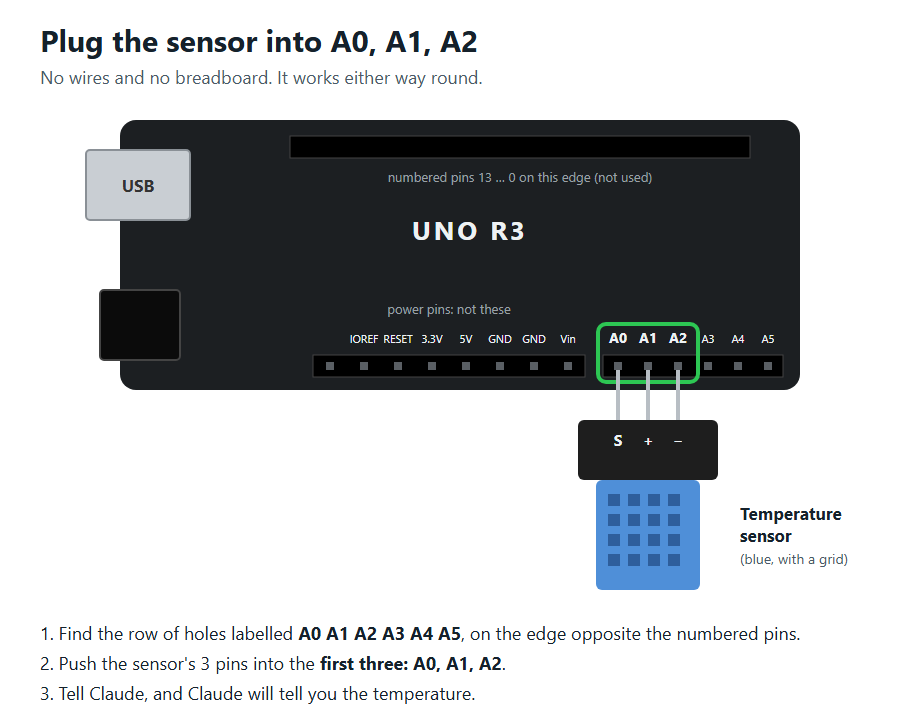
- It plugs straight into A0, A1 and A2. The program makes A1 a 5 V power pin, then tries the two outside pins both ways round until the sensor answers. So it works either way round, with no wires at all.
- The screen gets 4 bits at a time on pins 2 to 5. Its contrast comes from pin 9 and its backlight from pin 10, so there's no knob to adjust: you set them by typing commands instead.
- The clock counts microseconds. The kit has no clock chip, so the time is kept in a part of memory that survives pressing reset, but not unplugging. The computer can set it.
Build it
1Upload the code
Open the code below in the Arduino app and upload it to the UNO. See Getting started if this is new.
2Plug in the sensor
Push the DHT11 module's three pins straight into A0, A1, A2, either way round.
3Wire the screen
Put the screen's 16 pins in a row of the breadboard. Then run one wire from each screen pin's column to the Arduino:
| Screen pin | Name | Arduino |
|---|---|---|
| 1 | VSS | GND |
| 2 | VDD | 5V |
| 3 | V0 (contrast) | 9 |
| 4 | RS | 12 |
| 5 | RW | GND |
| 6 | E | 11 |
| 7 to 10 | D0 to D3 | nothing |
| 11 | D4 | 5 |
| 12 | D5 | 4 |
| 13 | D6 | 3 |
| 14 | D7 | 2 |
| 15 | A (backlight +) | 10 |
| 16 | K (backlight −) | GND |
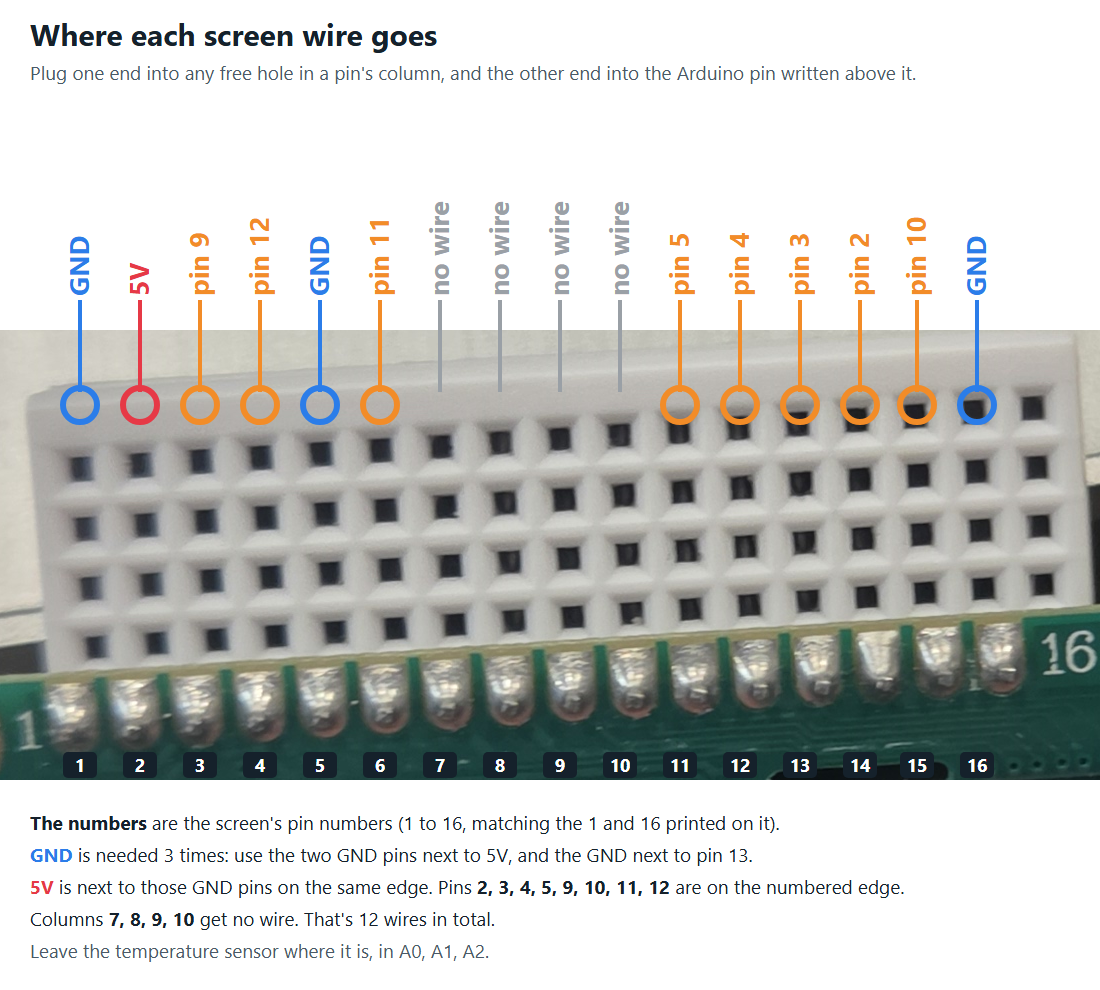
That's 12 wires. GND is needed 3 times: use the two GND pins next to 5V, and the one next to pin 13.
4Set the clock
Open the Serial Monitor (9600 baud, Newline) and type the time in 24-hour form, like T 14:30:00. On Windows you can run the optional sync-clock script instead.
5Battery (optional)
To switch to the 9V battery without losing the time: plug the battery into the round power socket first, then unplug the USB.
Commands
| Type this | What it does |
|---|---|
T 14:30:00 | Set the clock |
? | Show what time it thinks it is |
c 40 | Screen contrast, 0 to 255 (lower = darker letters) |
b 160 | Backlight brightness, 0 to 255 |
o -2.5 | Correct the temperature by this many °F to match a real thermometer |
Contrast, backlight and the correction are saved, so they stay the same on battery.
The 3D-printed case
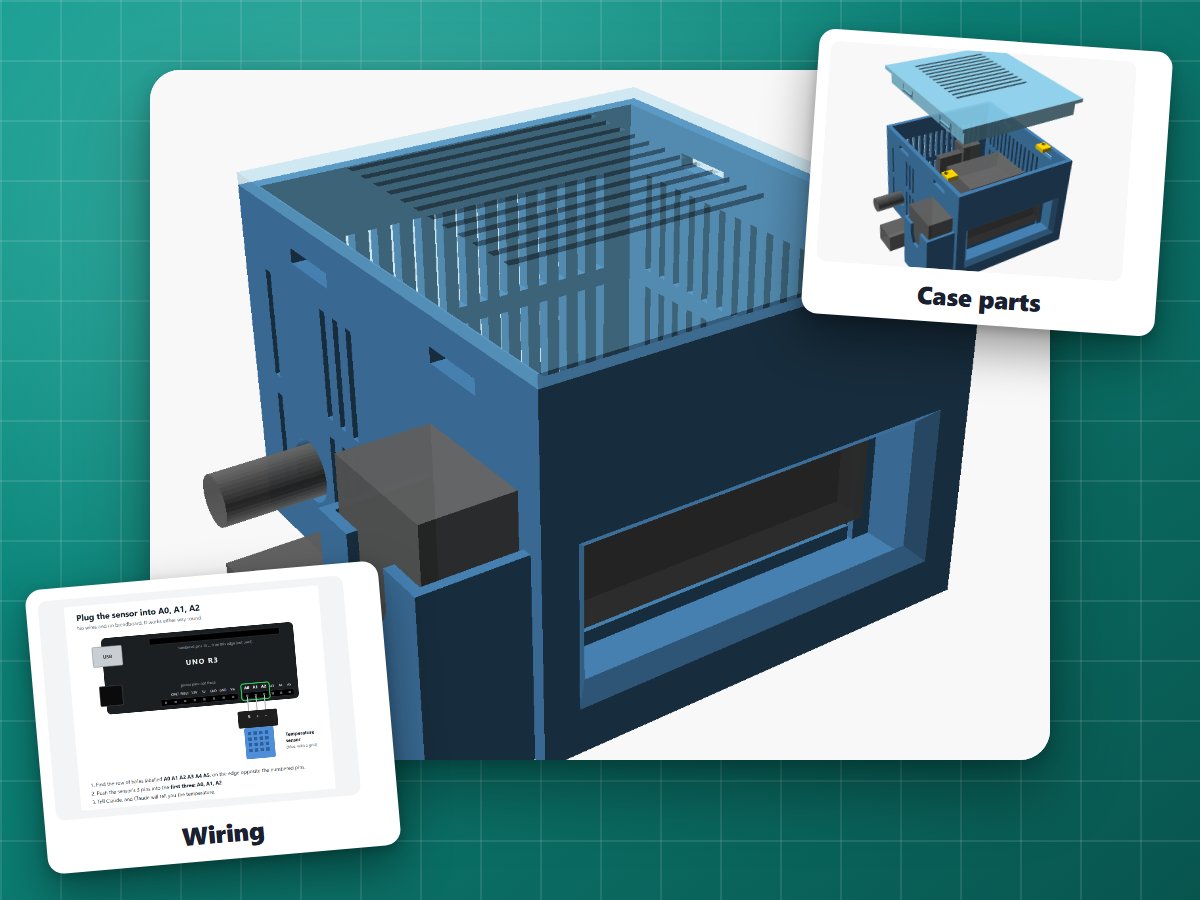
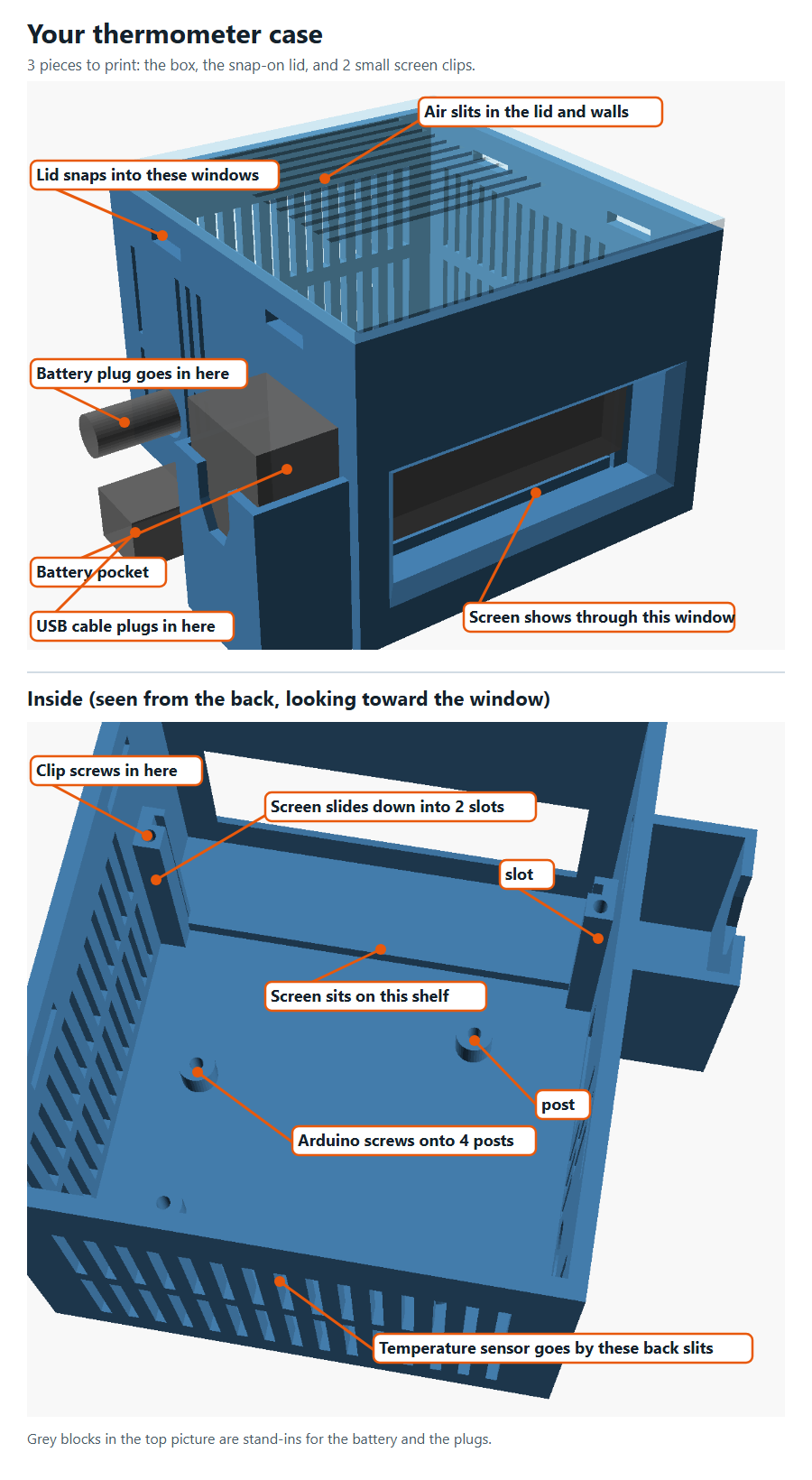
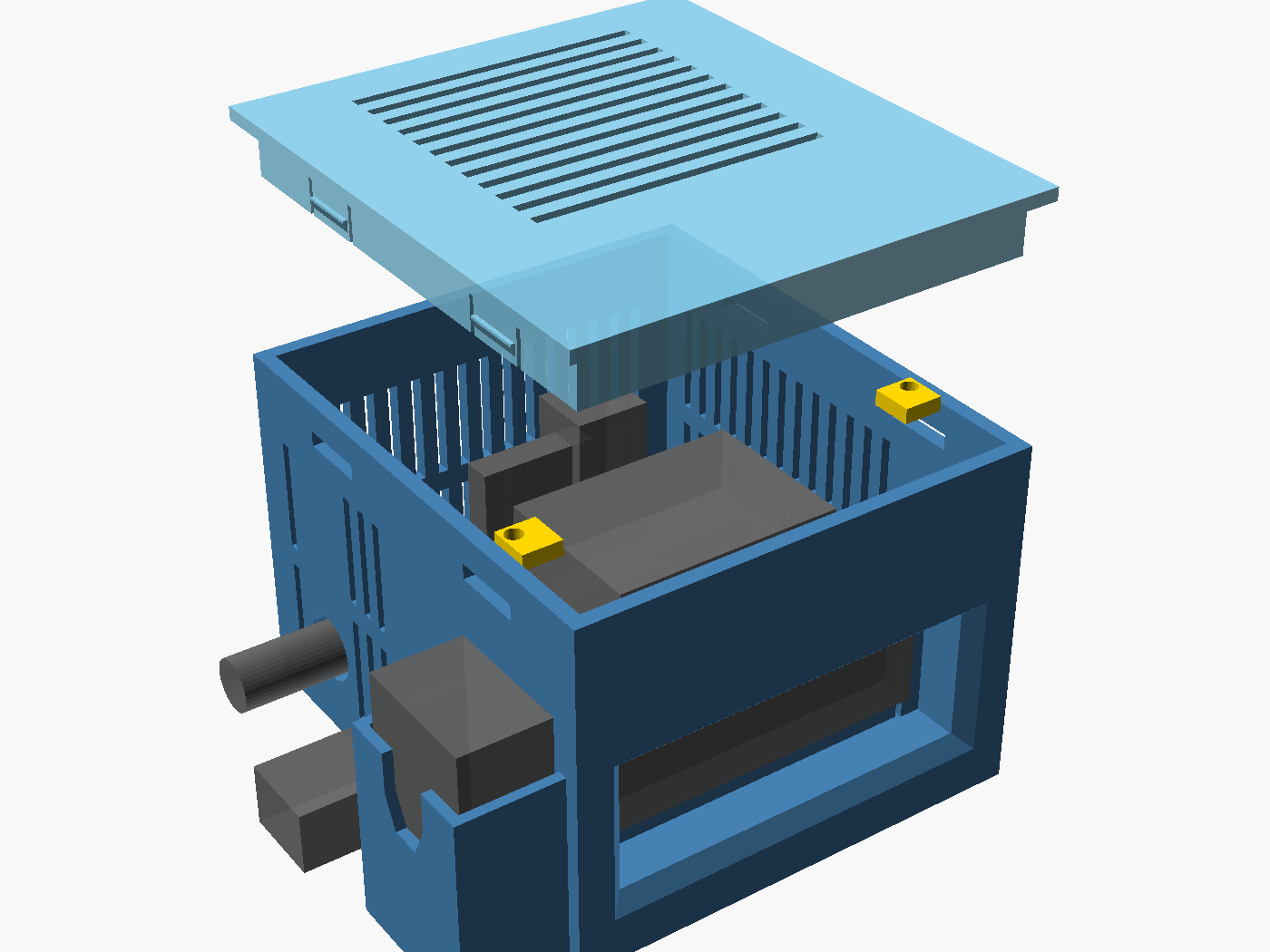
The screen sits behind a flared window, slides into two rails and is held by two clips. The Arduino sits on four posts with its USB port lined up with a hole in the side, and there's a hole for the power plug and a pocket for the 9V battery. The lid snaps on.
The push-in pegs replace screws: they're slightly tapered and wedge into the holes. The board pegs have a flat side on their heads, so turn the flat side toward any part sitting close to the hole.
If it doesn't work
- Random symbols on the screen (? / ö █): the screen missed its start-up message and got out of step. The program re-syncs it every 5 seconds, so it fixes itself. If it doesn't, check the wires on pins 2 to 5 and 11.
- The screen is lit but blank, or shows solid blocks: adjust the contrast with
c 20(darker) orc 60(lighter). - The temperature reads too high: your hands warm the sensor up when you handle it. Wait a few minutes. If it's still off, use
oto correct it. - The clock shows
--:--: it lost power, so set it again. - Upgrade idea: a DS1307 clock module (it's in the 37 Sensor Kit) has its own battery and would keep the time even when unplugged.
The code
One file, no libraries to install: the screen and sensor code are built in. The second tab is an optional Windows script that sets the clock from your computer.
Download all the code (.zip)// Room thermometer with a screen, using parts from the Elegoo kit.//// Temperature sensor (DHT11): plugged straight into A0, A1 and A2, either way// round. The middle pin (power) lands in A1, which this program sets HIGH.// Of the two outside pins, one is ground and one is the data line; the// program tries both ways and keeps the one that works.//// Screen (LCD1602), pin by pin. Pin 1 is the one marked VSS:// 1 VSS -> GND 2 VDD -> 5V 3 V0 -> pin 9 4 RS -> pin 12// 5 RW -> GND 6 E -> pin 11 7 to 10 -> nothing// 11 D4 -> pin 5 12 D5 -> pin 4 13 D6 -> pin 3 14 D7 -> pin 2// 15 A -> pin 10 16 K -> GND//// Top row: temperature and humidity. Bottom row: a clock. The computer sets// the clock; after that the Arduino keeps counting on its own, including on// the 9V battery. To switch to the battery without losing the time, plug the// battery into the round power socket first, then unplug the USB cable.//// From the computer:// "T 14:30:00" sets the clock// "?" asks what time the clock thinks it is// "c 40" sets the screen contrast, 0 to 255 (lower = darker letters)// "b 160" sets the backlight brightness, 0 to 255// "o -6.5" sets a correction in degrees F, to match a real thermometer// Contrast, backlight and correction are saved, so they stay the same on battery.#include <EEPROM.h>// ---------- Pins ----------const byte SENSOR_POWER = A1;const byte SENSOR_ENDS[2] = {A0, A2};const byte LCD_RS = 12;const byte LCD_E = 11;const byte LCD_DATA[4] = {5, 4, 3, 2}; // the screen's D4, D5, D6, D7const byte LCD_CONTRAST = 9;const byte LCD_LIGHT = 10;// ---------- Saved settings ----------struct Settings { byte check; byte contrast; byte backlight; float offsetF;};const byte SETTINGS_CHECK = 0x5A;Settings settings;// ---------- Clock ----------// The time lives in a part of memory that a reset doesn't wipe, so it// survives a press of the reset button (but not losing power).const unsigned long CLOCK_CHECK = 0xC10C4321;unsigned long clockCheck __attribute__((section(".noinit")));long secondsToday __attribute__((section(".noinit")));unsigned long lastTickMicros;long lastClockShown = -1;byte dataPin = A0;byte groundPin = A2;bool sensorFound = false;unsigned long lastReading = 0;void setup() { Serial.begin(9600); Serial.println("Thermometer starting"); EEPROM.get(0, settings); if (settings.check != SETTINGS_CHECK) { settings = {SETTINGS_CHECK, 40, 160, 0.0}; EEPROM.put(0, settings); } // Pins 9 and 10 flicker on and off very fast to set contrast and brightness. // Making them flicker faster (31,000 times a second) keeps the screen steady. TCCR1B = (TCCR1B & 0b11111000) | 0b001; pinMode(LCD_CONTRAST, OUTPUT); pinMode(LCD_LIGHT, OUTPUT); analogWrite(LCD_CONTRAST, settings.contrast); analogWrite(LCD_LIGHT, settings.backlight); if (clockCheck != CLOCK_CHECK || secondsToday < 0 || secondsToday >= 86400L) { clockCheck = 0; // no time yet: the clock shows --:-- until the computer sends it secondsToday = 0; } lastTickMicros = micros(); lcdBegin(); lcdPrintAt(0, 0, "Thermometer "); showClock(); pinMode(SENSOR_POWER, OUTPUT); digitalWrite(SENSOR_POWER, HIGH); pinMode(LED_BUILTIN, OUTPUT);}void loop() { readComputer(); keepTime(); if (secondsToday != lastClockShown) showClock(); if (millis() - lastReading >= 5000 || lastReading == 0) updateReading();}// ---------- Clock ----------// Counts the seconds using the Arduino's own timer.void keepTime() { while (micros() - lastTickMicros >= 1000000UL) { lastTickMicros += 1000000UL; secondsToday = (secondsToday + 1) % 86400L; }}// Shows e.g. "3:45:12 PM" in the middle of the bottom row.void showClock() { lastClockShown = secondsToday; char time[12], line[17]; if (clockCheck == CLOCK_CHECK) { int hours = secondsToday / 3600; int hours12 = hours % 12 == 0 ? 12 : hours % 12; snprintf(time, sizeof(time), "%d:%02d:%02d %s", hours12, (int)(secondsToday / 60 % 60), (int)(secondsToday % 60), hours < 12 ? "AM" : "PM"); } else { strcpy(time, "--:--"); } byte length = strlen(time); byte left = (16 - length) / 2; memset(line, ' ', 16); memcpy(line + left, time, length); line[16] = '\0'; lcdPrintAt(0, 1, line);}// ---------- Temperature ----------void updateReading() { lastReading = millis(); if (lastReading == 0) lastReading = 1; byte reading[5]; bool ok; if (!sensorFound) { // Try the data line on each outside pin, with the other one as ground. ok = false; for (byte i = 0; i < 2 && !ok; i++) { useSensorWiring(SENSOR_ENDS[i], SENSOR_ENDS[1 - i]); delay(1500); // the sensor needs a moment after it gets power ok = readSensor(reading); } sensorFound = ok; } else { ok = readSensor(reading); } // Repeat the screen's start-up routine before every update, so a screen // that got power late (or had a glitch) gets back in step. lcdWake(); if (!ok) { Serial.println("Can't read the sensor. Is it plugged into A0, A1 and A2?"); lcdPrintAt(0, 0, "Sensor? A0 A1 A2"); showClock(); return; } float celsius = reading[2] + reading[3] / 10.0; float fahrenheit = celsius * 9 / 5 + 32 + settings.offsetF; byte humidity = reading[0]; Serial.print("Temperature: "); Serial.print(fahrenheit, 1); Serial.print(" F Humidity: "); Serial.print(humidity); Serial.println("%"); showReading(fahrenheit, humidity); showClock(); digitalWrite(LED_BUILTIN, HIGH); delay(100); digitalWrite(LED_BUILTIN, LOW);}// Shows e.g. 72.5°F 45%void showReading(float fahrenheit, byte humidity) { char f[8], line[17]; dtostrf(fahrenheit, 4, 1, f); snprintf(line, sizeof(line), " %s\xDF" "F %d%%", f, humidity); byte length = strlen(line); while (length < 16) line[length++] = ' '; // blank out anything left over line[16] = '\0'; lcdPrintAt(0, 0, line);}// ---------- Settings from the computer ----------void printTime() { if (clockCheck != CLOCK_CHECK) { Serial.println("Clock not set"); return; } char text[9]; sprintf(text, "%02d:%02d:%02d", (int)(secondsToday / 3600), (int)(secondsToday / 60 % 60), (int)(secondsToday % 60)); Serial.println(text);}void readComputer() { static char line[20]; static byte length = 0; while (Serial.available()) { char ch = Serial.read(); if (ch == '\n' || ch == '\r') { line[length] = '\0'; if (length > 0) handleCommand(line); length = 0; } else if (length < sizeof(line) - 1) { line[length++] = ch; } }}void handleCommand(const char *line) { int h, m, s; if (sscanf(line, "T %d:%d:%d", &h, &m, &s) == 3 && h >= 0 && h < 24 && m >= 0 && m < 60 && s >= 0 && s < 60) { secondsToday = h * 3600L + m * 60L + s; lastTickMicros = micros(); clockCheck = CLOCK_CHECK; showClock(); Serial.print("Clock set to "); printTime(); return; } if (line[0] == '?') { printTime(); return; } float value = atof(line + 1); if (line[0] == 'c') { settings.contrast = constrain((int)value, 0, 255); analogWrite(LCD_CONTRAST, settings.contrast); } else if (line[0] == 'b') { settings.backlight = constrain((int)value, 0, 255); analogWrite(LCD_LIGHT, settings.backlight); } else if (line[0] == 'o') { settings.offsetF = value; lastReading = 0; // show the corrected temperature straight away } else { return; } EEPROM.put(0, settings); Serial.print("Saved: contrast "); Serial.print(settings.contrast); Serial.print(", backlight "); Serial.print(settings.backlight); Serial.print(", correction "); Serial.print(settings.offsetF, 1); Serial.println(" F");}// ---------- Temperature sensor ----------void useSensorWiring(byte data, byte ground) { dataPin = data; groundPin = ground; pinMode(groundPin, OUTPUT); digitalWrite(groundPin, LOW); pinMode(dataPin, INPUT_PULLUP);}// Asks the sensor for a reading. It answers with 40 quick pulses: a short// pulse is a 0 and a long one is a 1. The 5 bytes are humidity, humidity// tenths, temperature, temperature tenths, and a check number.bool readSensor(byte data[5]) { for (byte i = 0; i < 5; i++) data[i] = 0; pinMode(dataPin, OUTPUT); digitalWrite(dataPin, LOW); // "wake up" signal delay(20); pinMode(dataPin, INPUT_PULLUP); if (!waitFor(LOW, 200) || !waitFor(HIGH, 200) || !waitFor(LOW, 200)) return false; for (byte bit = 0; bit < 40; bit++) { if (!waitFor(HIGH, 200)) return false; unsigned long start = micros(); if (!waitFor(LOW, 200)) return false; data[bit / 8] <<= 1; if (micros() - start > 45) data[bit / 8] |= 1; } return data[4] == (byte)(data[0] + data[1] + data[2] + data[3]);}bool waitFor(byte level, unsigned int timeoutMicros) { unsigned long start = micros(); while (digitalRead(dataPin) != level) { if (micros() - start > timeoutMicros) return false; } return true;}// ---------- Screen ----------// The screen takes letters 4 bits at a time on its D4-D7 pins. RS picks// between a command (LOW) and a letter (HIGH), and a pulse on E sends it.void lcdBegin() { pinMode(LCD_RS, OUTPUT); pinMode(LCD_E, OUTPUT); for (byte i = 0; i < 4; i++) pinMode(LCD_DATA[i], OUTPUT); digitalWrite(LCD_E, LOW); digitalWrite(LCD_RS, LOW); delay(50); // give the screen time to wake up lcdWake(); lcdSend(0x01, false); // clear the screen delay(2);}// The screen's start-up routine: whatever state it's in, this switches it// into 4-bit mode with 2 lines of text. It doesn't clear the screen, so it// can be repeated without any flicker.void lcdWake() { digitalWrite(LCD_RS, LOW); lcdNibble(0x3); delay(5); lcdNibble(0x3); delayMicroseconds(150); lcdNibble(0x3); delayMicroseconds(150); lcdNibble(0x2); delayMicroseconds(150); lcdSend(0x28, false); // 2 lines of text lcdSend(0x0C, false); // screen on, no cursor lcdSend(0x06, false); // move right after each letter}void lcdNibble(byte bits) { for (byte i = 0; i < 4; i++) digitalWrite(LCD_DATA[i], (bits >> i) & 1); digitalWrite(LCD_E, HIGH); delayMicroseconds(1); digitalWrite(LCD_E, LOW); delayMicroseconds(100);}void lcdSend(byte value, bool isLetter) { digitalWrite(LCD_RS, isLetter ? HIGH : LOW); lcdNibble(value >> 4); lcdNibble(value & 0x0F);}void lcdPrintAt(byte column, byte row, const char *text) { lcdSend(0x80 | (column + (row ? 0x40 : 0)), false); while (*text) lcdSend(*text++, true);}Optional (Windows): sends the computer's time to the clock. It finds boards that Windows names "Arduino"; for others, run it with -Port COM5 (your port).
# Sends this computer's time to the thermometer's clock over USB.# Finds the Arduino by itself, connects without restarting it, and only sends# the time if the thermometer program answers. Quietly does nothing if the# Arduino isn't plugged in, is running a different program, or is busy.param([string]$Port)if (-not $Port) { $device = Get-CimInstance Win32_PnPEntity -Filter "Name LIKE 'Arduino%(COM%)'" | Select-Object -First 1 if (-not $device -or $device.Name -notmatch '\((COM\d+)\)') { exit 0 } $Port = $Matches[1]}$serial = New-Object System.IO.Ports.SerialPort $Port, 9600$serial.DtrEnable = $false # keeps the Arduino from restarting when we connect$serial.NewLine = "`n"try { $serial.Open()} catch { exit 0}try { # Ask what time it thinks it is. Only the thermometer program answers this. $serial.DiscardInBuffer() $serial.WriteLine("?") Start-Sleep -Milliseconds 400 if ($serial.ReadExisting() -notmatch 'Clock not set|\d\d:\d\d:\d\d') { exit 0 } # Wait for the start of the next second so the clock lines up exactly. Start-Sleep -Milliseconds (1000 - (Get-Date).Millisecond) $serial.WriteLine("T " + (Get-Date).ToString("HH:mm:ss")) Start-Sleep -Milliseconds 300 $serial.ReadExisting()} finally { $serial.Close()}