ArduinoEasy30 minutes
Air Piano
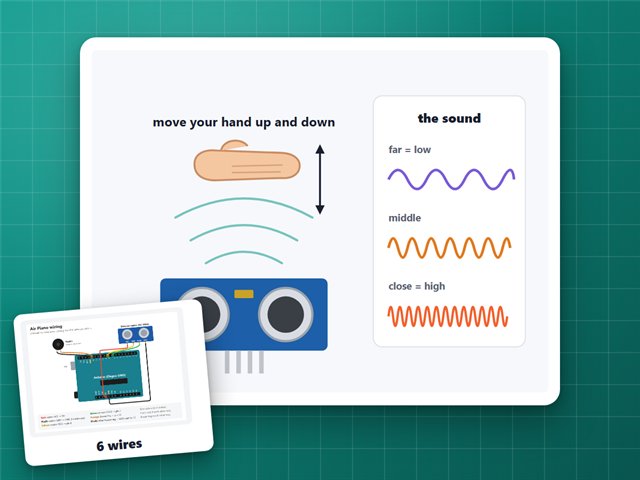
Eight notes you play by holding your hand at different heights over a sensor: every 2 inches is the next note, from C up to high C.
Board: Arduino UNO (Elegoo UNO R3)
What you need
What it is
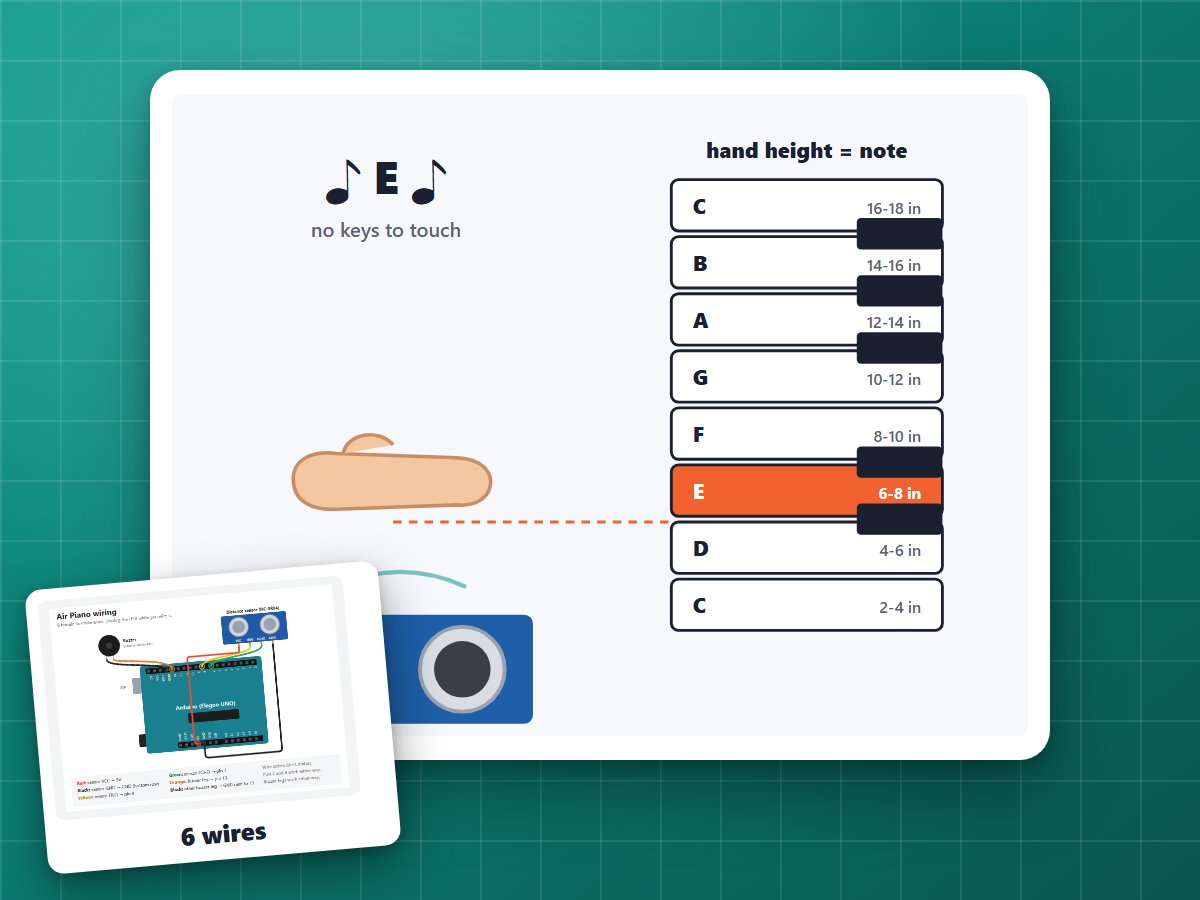
An invisible keyboard in the air above a sensor. Hold your hand at different heights and it plays a different note. Take your hand away and it stops.
| Hand height | Note |
|---|---|
| 2 to 4 in | C |
| 4 to 6 in | D |
| 6 to 8 in | E |
| 8 to 10 in | F |
| 10 to 12 in | G |
| 12 to 14 in | A |
| 14 to 16 in | B |
| 16 to 18 in | high C |
Try "Mary Had a Little Lamb": E D C D E E E.
How it works
- The ultrasonic sensor measures how far away your hand is about 30 times a second, and the program uses the middle of the last 3 readings so one bad echo doesn't play a wrong note.
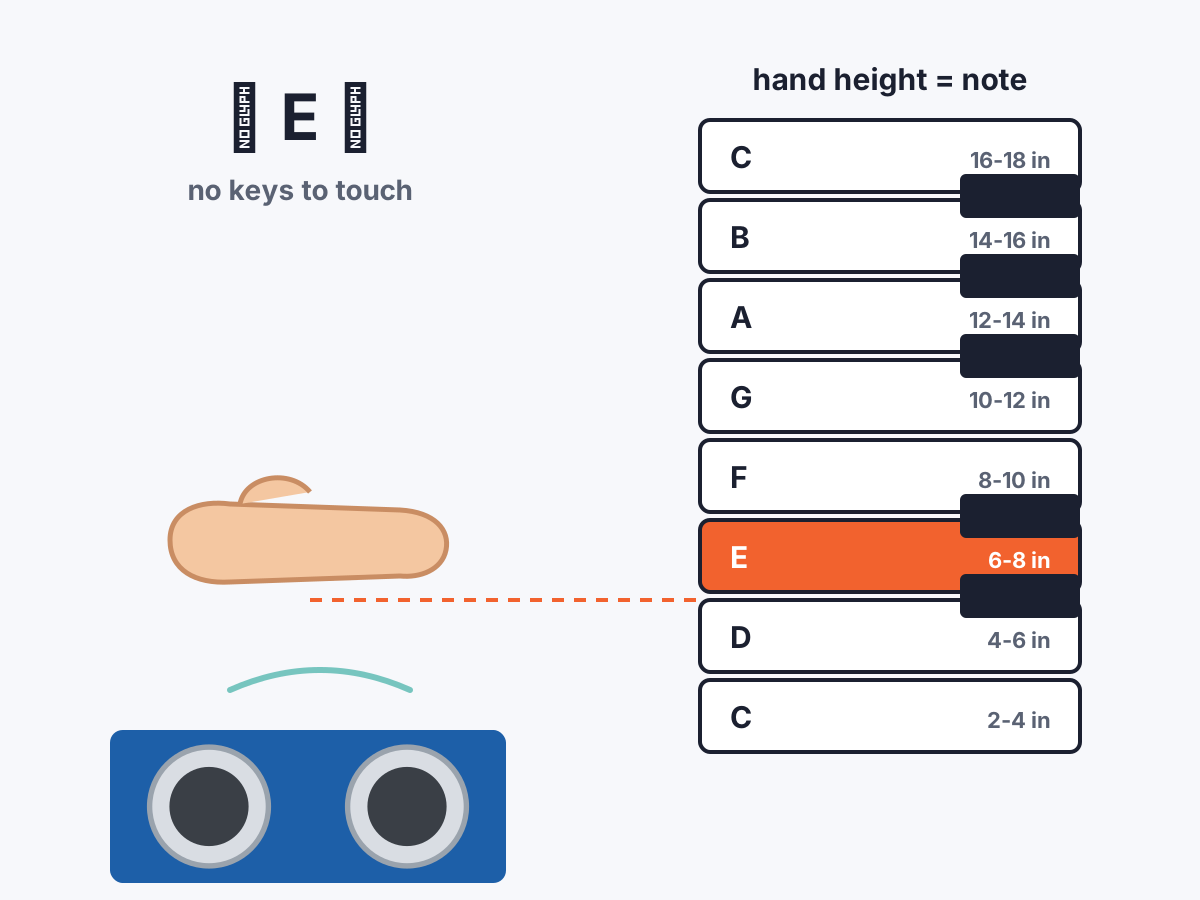
- Each 2-inch band is one note. Near the edge of a band it waits until your hand is clearly past it (0.4 in), so the note doesn't flicker between two.
- The notes are high ones (C6 to C7) because the little buzzer is loudest up there.
- With a screen, the top line shows the note with music symbols and the bottom line shows a keyboard, with the key you're playing lit up.
Build it
1Upload the code
Upload the code below (see Getting started).
2Wire it
Same wiring as the Air Theremin:
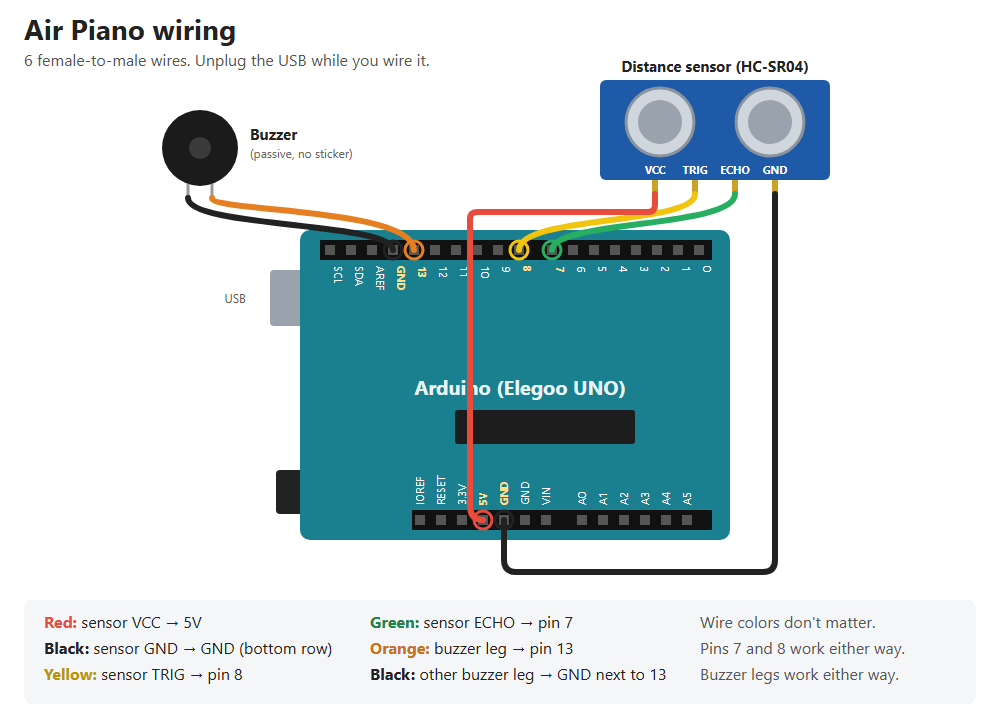
- Sensor: Vcc → 5V, Trig → 8, Echo → 7, Gnd → GND (Trig and Echo can be either way round).
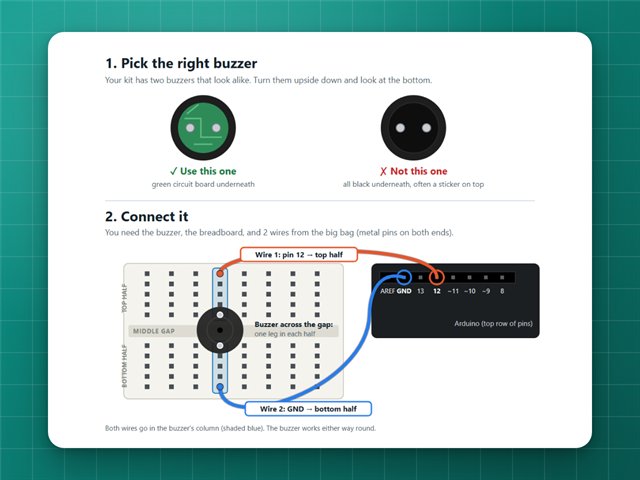
- Buzzer: one leg → pin 13, the other → the GND right next to pin 13 (either way round).
- Screen (optional): wired like the Distance Meter.
Commands
| Type | What it does |
|---|---|
m | Mute / unmute (the screen still shows the notes) |
? | Is the sensor connected, and how far away is the nearest thing |
f | Blink the L light 3 times |
c 40, b 160 | Screen contrast and backlight |
If it doesn't work
- No sound: type
?to check the sensor. Make sure it's the passive buzzer (no sticker). - Wrong notes: keep your hand flat and level over the sensor, and keep other things out of its way.
- Want it smooth instead? Upload the Air Theremin: same wiring, and it has this piano mode built in too.
The code
Copy it into the Arduino app, or download the file. New to this? Start with Getting started.
// Air piano: hold your hand over the ultrasonic sensor and move it up and down.// Each 2-inch step is a different note, from C (closest) up to the next C// (furthest). Take your hand away and it goes quiet.//// 2 to 4 in = C 4 to 6 = D 6 to 8 = E 8 to 10 = F// 10 to 12 = G 12 to 14 = A 14 to 16 = B 16 to 18 = high C//// Wiring is the same as the distance meter, plus the buzzer:// Ultrasonic sensor (HC-SR04), 4 female-to-male wires:// Vcc -> 5V Trig -> pin 8 Echo -> pin 7 Gnd -> GND// (Trig and Echo can go in 7 and 8 either way round, the program checks.)// Screen (LCD1602), pin by pin. Pin 1 is the one marked VSS:// 1 VSS -> GND 2 VDD -> A0 3 V0 -> pin 9 4 RS -> pin 12// 5 RW -> A1 6 E -> pin 11 7 to 10 -> nothing// 11 D4 -> pin 5 12 D5 -> pin 4 13 D6 -> pin 3 14 D7 -> pin 2// 15 A -> pin 10 16 K -> A2// Buzzer (the starter kit's passive one, no sticker), 2 female-to-male wires:// one leg -> pin 13, the other leg -> the GND right next to pin 13.// Either way round works. The board's "L" light blinks along with the notes.// The screen is optional: without it the piano still plays.//// From the computer:// "c 40" screen contrast, 0 to 255 (lower = darker letters)// "b 160" backlight brightness, 0 to 255// "m" mute / unmute (the screen still shows the notes)// "?" is the sensor connected, and how far away is the nearest thing// "f" blink the "L" light 3 times (to find this board)// Contrast, backlight and mute are saved.#include <EEPROM.h>// ---------- Pins ----------const byte SENSOR_PINS[2] = {7, 8};byte trigPin = 7;byte echoPin = 8;const byte BUZZER = 13;const byte LCD_POWER = A0;const byte LCD_RW = A1;const byte LCD_GROUND = A2; // the backlight's K pinconst byte LCD_RS = 12;const byte LCD_E = 11;const byte LCD_DATA[4] = {5, 4, 3, 2}; // the screen's D4, D5, D6, D7const byte LCD_CONTRAST = 9;const byte LCD_LIGHT = 10;// ---------- Notes ----------// One octave of C major. These are an octave above middle C's octave, because// the little buzzer is much louder at higher pitches.const byte NOTE_COUNT = 8;const char NOTE_NAMES[NOTE_COUNT] = {'C', 'D', 'E', 'F', 'G', 'A', 'B', 'C'};const unsigned int NOTE_HZ[NOTE_COUNT] = {1047, 1175, 1319, 1397, 1568, 1760, 1976, 2093};const float FIRST_NOTE_AT = 2.0; // inches from the sensor where the first C startsconst float NOTE_WIDTH = 2.0; // inches per noteconst float WOBBLE = 0.4; // a hand has to move this far past a line to change noteconst int NO_NOTE = -1;// ---------- Measuring ----------const float MICROS_PER_INCH = 148.0; // sound out and back, per inch, at room temperatureconst unsigned long LISTEN_MICROS = 4500; // stop listening after ~30 inchesconst unsigned long PING_GAP_MS = 30; // short rest so old echoes die awayconst unsigned long QUIET_AFTER_MS = 150; // a hand has to be gone this long before it goes quiet// ---------- Saved settings ----------struct Settings { byte check; byte contrast; byte backlight; byte muted;};const byte SETTINGS_CHECK = 0xA9;Settings settings;int playing = NO_NOTE;unsigned long lastHandSeen = 0;float recent[3] = {0, 0, 0}; // last 3 readings, so one stray echo can't jump the notebyte recentNext = 0; // which of the 3 gets the next readingbyte recentCount = 0; // how many fresh readings there are (stops at 3)void setup() { Serial.begin(9600); Serial.println("Air piano starting"); EEPROM.get(0, settings); if (settings.check != SETTINGS_CHECK) { settings = {SETTINGS_CHECK, 40, 160, 0}; EEPROM.put(0, settings); } // Pins 9 and 10 flicker very fast (31,000 times a second) to set contrast // and brightness without the screen shimmering. TCCR1B = (TCCR1B & 0b11111000) | 0b001; pinMode(LCD_CONTRAST, OUTPUT); pinMode(LCD_LIGHT, OUTPUT); analogWrite(LCD_CONTRAST, settings.contrast); analogWrite(LCD_LIGHT, settings.backlight); pinMode(LCD_RW, OUTPUT); digitalWrite(LCD_RW, LOW); pinMode(LCD_GROUND, OUTPUT); digitalWrite(LCD_GROUND, LOW); pinMode(LCD_POWER, OUTPUT); digitalWrite(LCD_POWER, HIGH); delay(100); lcdBegin(); makeNoteSymbol(); pinMode(BUZZER, OUTPUT); findSensorPins(); playStartTune(); showIdle(); Serial.println(settings.muted ? "Ready (muted)" : "Ready");}void loop() { readComputer(); float inches = readInches(); if (inches > 0) { recent[recentNext] = inches; recentNext = (recentNext + 1) % 3; if (recentCount < 3) recentCount++; } else { findSensorPins(); // in case the wires were swapped or plugged in late } int note = NO_NOTE; if (inches > 0 && recentCount >= 3) { note = pickNote(middleOf3()); } if (note != NO_NOTE) { lastHandSeen = millis(); if (note != playing) startNote(note); } else if (playing != NO_NOTE && millis() - lastHandSeen > QUIET_AFTER_MS) { stopNote(); } delay(PING_GAP_MS);}// ---------- Notes ----------// Turns a distance into a note number (0 = low C ... 7 = high C), or NO_NOTE.// Near a line between two notes it keeps the current note, so it doesn't flutter.int pickNote(float inches) { if (playing != NO_NOTE) { float low = FIRST_NOTE_AT + playing * NOTE_WIDTH - WOBBLE; float high = FIRST_NOTE_AT + (playing + 1) * NOTE_WIDTH + WOBBLE; if (inches >= low && inches < high) return playing; } if (inches < FIRST_NOTE_AT) return NO_NOTE; int note = (int)((inches - FIRST_NOTE_AT) / NOTE_WIDTH); return note < NOTE_COUNT ? note : NO_NOTE;}void startNote(int note) { playing = note; if (!settings.muted) tone(BUZZER, NOTE_HZ[note]); showNote(note); Serial.print("Note "); Serial.print(NOTE_NAMES[note]); if (note == NOTE_COUNT - 1) Serial.print(" (high)"); Serial.print(" at "); Serial.print(middleOf3(), 1); Serial.println(" in");}void stopNote() { playing = NO_NOTE; noTone(BUZZER); digitalWrite(BUZZER, LOW); recentCount = 0; showIdle(); Serial.println("Quiet");}void playStartTune() { if (settings.muted) return; const byte tune[] = {0, 2, 4, 7}; for (byte i = 0; i < sizeof(tune); i++) { tone(BUZZER, NOTE_HZ[tune[i]], 110); delay(140); } noTone(BUZZER);}// ---------- Measuring ----------// Pins 7 and 8: with a pull-up on, the Echo pin still reads LOW because the// sensor holds it there; the Trig pin reads HIGH. If it can't tell, it keeps// the last choice.void findSensorPins() { pinMode(SENSOR_PINS[0], INPUT_PULLUP); pinMode(SENSOR_PINS[1], INPUT_PULLUP); delay(2); bool low0 = digitalRead(SENSOR_PINS[0]) == LOW; bool low1 = digitalRead(SENSOR_PINS[1]) == LOW; if (low0 != low1) { echoPin = low0 ? SENSOR_PINS[0] : SENSOR_PINS[1]; trigPin = low0 ? SENSOR_PINS[1] : SENSOR_PINS[0]; } pinMode(echoPin, INPUT); pinMode(trigPin, OUTPUT); digitalWrite(trigPin, LOW);}// One ping. Returns the distance in inches, or 0 if nothing answered within ~30 in.float readInches() { digitalWrite(trigPin, LOW); delayMicroseconds(2); digitalWrite(trigPin, HIGH); delayMicroseconds(10); digitalWrite(trigPin, LOW); unsigned long microseconds = pulseIn(echoPin, HIGH, LISTEN_MICROS); return microseconds == 0 ? 0 : microseconds / MICROS_PER_INCH;}float middleOf3() { float a = recent[0], b = recent[1], c = recent[2]; if ((a <= b && b <= c) || (c <= b && b <= a)) return b; if ((b <= a && a <= c) || (c <= a && a <= b)) return a; return c;}// ---------- Screen ----------// top row: ♪ E ♪ (or "Air Piano" when quiet)// bottom row: C D E F G A B C with a solid block on the note being played// The music note lives in the screen's custom character slot 0. The screen// shows slot 0 for code 0 or code 8; using 8 keeps it from ending the text.const byte NOTE_SYMBOL_SLOT = 0;const char NOTE_SYMBOL = 8;void showNote(int note) { char top[17] = " "; top[4] = NOTE_SYMBOL; top[11] = NOTE_SYMBOL; top[7] = NOTE_NAMES[note]; if (note == NOTE_COUNT - 1) { // high C top[7] = 'C'; top[8] = '\''; } lcdWake(); lcdPrintRow(0, top); lcdPrintRow(1, keyboardRow(note));}void showIdle() { lcdWake(); lcdPrintRow(0, settings.muted ? " Air Piano mute" : " Air Piano"); lcdPrintRow(1, "Hand 2-18in away");}const char *keyboardRow(int note) { static char row[17]; for (byte i = 0; i < NOTE_COUNT; i++) { row[i * 2] = ' '; row[i * 2 + 1] = (i == note) ? (char)0xFF : NOTE_NAMES[i]; // 0xFF = solid block } row[16] = '\0'; return row;}// A little music note, drawn dot by dot (5 wide, 8 tall).void makeNoteSymbol() { const byte rows[8] = { 0b00100, 0b00110, 0b00101, 0b00100, 0b00100, 0b01100, 0b11100, 0b01000, }; lcdSend(0x40 | (NOTE_SYMBOL_SLOT << 3), false); for (byte i = 0; i < 8; i++) lcdSend(rows[i], true); lcdSend(0x80, false); // back to writing letters}// "?" from the computer: is the sensor there, and what does it see right now?// With a pull-up on, a powered sensor holds its Echo pin LOW; with no sensor// (or no power), both pins read HIGH.void reportStatus() { pinMode(SENSOR_PINS[0], INPUT_PULLUP); pinMode(SENSOR_PINS[1], INPUT_PULLUP); delay(2); bool low0 = digitalRead(SENSOR_PINS[0]) == LOW; bool low1 = digitalRead(SENSOR_PINS[1]) == LOW; findSensorPins(); Serial.print("Sensor: "); if (low0 != low1) { Serial.print("found (Trig "); Serial.print(trigPin); Serial.print(", Echo "); Serial.print(echoPin); Serial.print(")"); } else if (low0 && low1) { Serial.print("NOT found: pins 7 and 8 both pulled LOW (wires in, but no power? check 5V/GND)"); } else { Serial.print("NOT found: pins 7 and 8 both HIGH (Trig/Echo wires not connected?)"); } delay(60); float inches = readInches(); Serial.print(" sees: "); if (inches > 0) { Serial.print(inches, 1); Serial.print(" in"); } else { Serial.print("nothing within 30 in"); } Serial.println(settings.muted ? " sound: muted" : " sound: on");}// ---------- Settings from the computer ----------void readComputer() { static char line[20]; static byte length = 0; while (Serial.available()) { char ch = Serial.read(); if (ch == '\n' || ch == '\r') { line[length] = '\0'; if (length > 0) handleCommand(line); length = 0; } else if (length < sizeof(line) - 1) { line[length++] = ch; } }}void handleCommand(const char *line) { int value = constrain(atoi(line + 1), 0, 255); if (line[0] == 'c') { settings.contrast = value; analogWrite(LCD_CONTRAST, settings.contrast); } else if (line[0] == 'b') { settings.backlight = value; analogWrite(LCD_LIGHT, settings.backlight); } else if (line[0] == '?') { reportStatus(); return; } else if (line[0] == 'f') { // Three quick blinks of the "L" light, to find which board this is. noTone(BUZZER); for (byte i = 0; i < 3; i++) { digitalWrite(BUZZER, HIGH); delay(150); digitalWrite(BUZZER, LOW); delay(150); } if (playing != NO_NOTE && !settings.muted) tone(BUZZER, NOTE_HZ[playing]); Serial.println("Blinked"); return; } else if (line[0] == 'm') { settings.muted = !settings.muted; if (settings.muted) noTone(BUZZER); else if (playing != NO_NOTE) tone(BUZZER, NOTE_HZ[playing]); if (playing == NO_NOTE) showIdle(); } else { return; } EEPROM.put(0, settings); Serial.print("Saved: contrast "); Serial.print(settings.contrast); Serial.print(", backlight "); Serial.print(settings.backlight); Serial.println(settings.muted ? ", muted" : ", sound on");}// ---------- Screen driver ----------// The screen takes letters 4 bits at a time on its D4-D7 pins. RS picks// between a command (LOW) and a letter (HIGH), and a pulse on E sends it.void lcdBegin() { pinMode(LCD_RS, OUTPUT); pinMode(LCD_E, OUTPUT); for (byte i = 0; i < 4; i++) pinMode(LCD_DATA[i], OUTPUT); digitalWrite(LCD_E, LOW); digitalWrite(LCD_RS, LOW); delay(50); lcdWake(); lcdSend(0x01, false); // clear the screen delay(2);}// The screen's start-up routine. Repeating it before each update gets a// screen that had a glitch back in step, without clearing it.void lcdWake() { digitalWrite(LCD_RS, LOW); lcdNibble(0x3); delay(5); lcdNibble(0x3); delayMicroseconds(150); lcdNibble(0x3); delayMicroseconds(150); lcdNibble(0x2); delayMicroseconds(150); lcdSend(0x28, false); // 2 lines of text lcdSend(0x0C, false); // screen on, no cursor lcdSend(0x06, false); // move right after each letter}void lcdNibble(byte bits) { for (byte i = 0; i < 4; i++) digitalWrite(LCD_DATA[i], (bits >> i) & 1); digitalWrite(LCD_E, HIGH); delayMicroseconds(1); digitalWrite(LCD_E, LOW); delayMicroseconds(100);}void lcdSend(byte value, bool isLetter) { digitalWrite(LCD_RS, isLetter ? HIGH : LOW); lcdNibble(value >> 4); lcdNibble(value & 0x0F);}// Writes a whole row: the text, then spaces to fill all 16 places.void lcdPrintRow(byte row, const char *text) { lcdSend(0x80 | (row ? 0x40 : 0), false); bool ended = false; for (byte i = 0; i < 16; i++) { if (text[i] == '\0') ended = true; lcdSend(ended ? ' ' : text[i], true); }}