Buzzer Songs
Your Arduino plays Happy Birthday, Twinkle Twinkle, Ode to Joy and Jingle Bells on a little buzzer, and the next song every time you press reset.
Board: Arduino UNO (Elegoo UNO R3)
What you need
What it is
A great second project. A tiny buzzer plays four songs:
- Happy Birthday
- Twinkle Twinkle Little Star
- Ode to Joy
- Jingle Bells
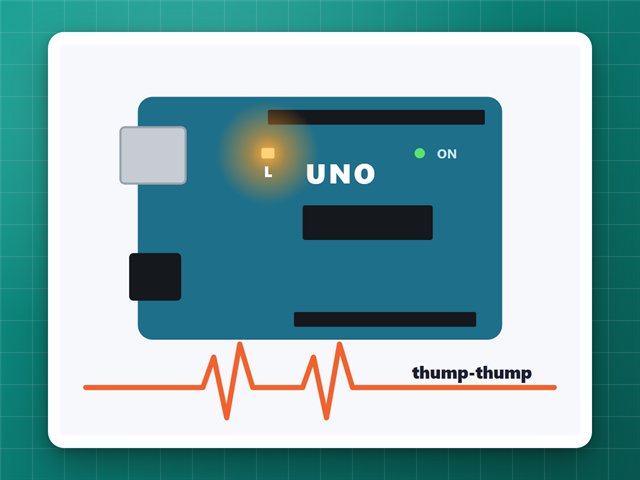
Each time the board starts, or you press its red reset button, it plays the next song. The board's L light flashes along with the notes.
How it works
- A passive buzzer is a tiny speaker. The Arduino's
tone()command switches the pin on and off very fast, and how fast it switches is the note: 440 times a second is the A above middle C. - Each song is a list of notes and lengths, stored in the board's program memory (
PROGMEM) so it doesn't use up the small working memory. - It remembers which song is next in EEPROM, a bit of memory that keeps its contents with the power off.
Build it
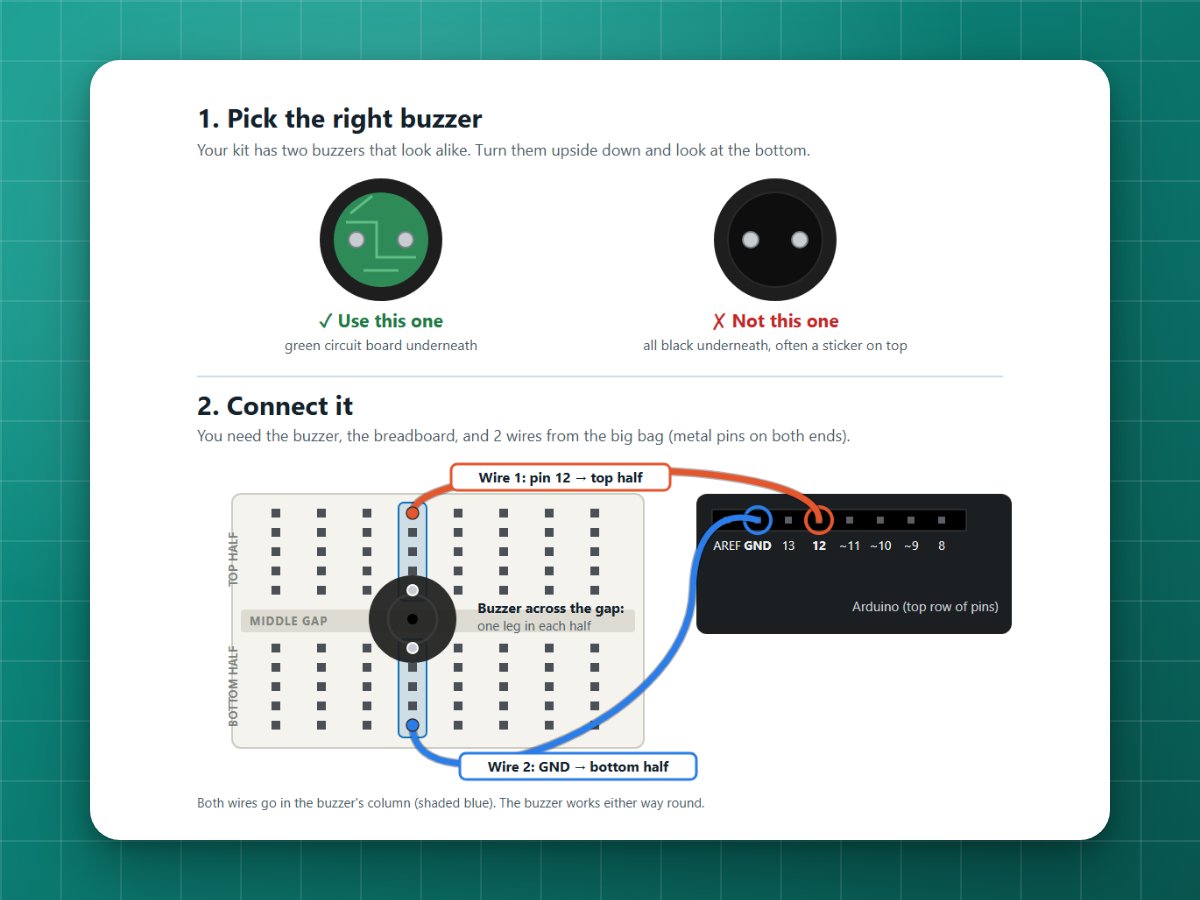
1Put the buzzer on the breadboard
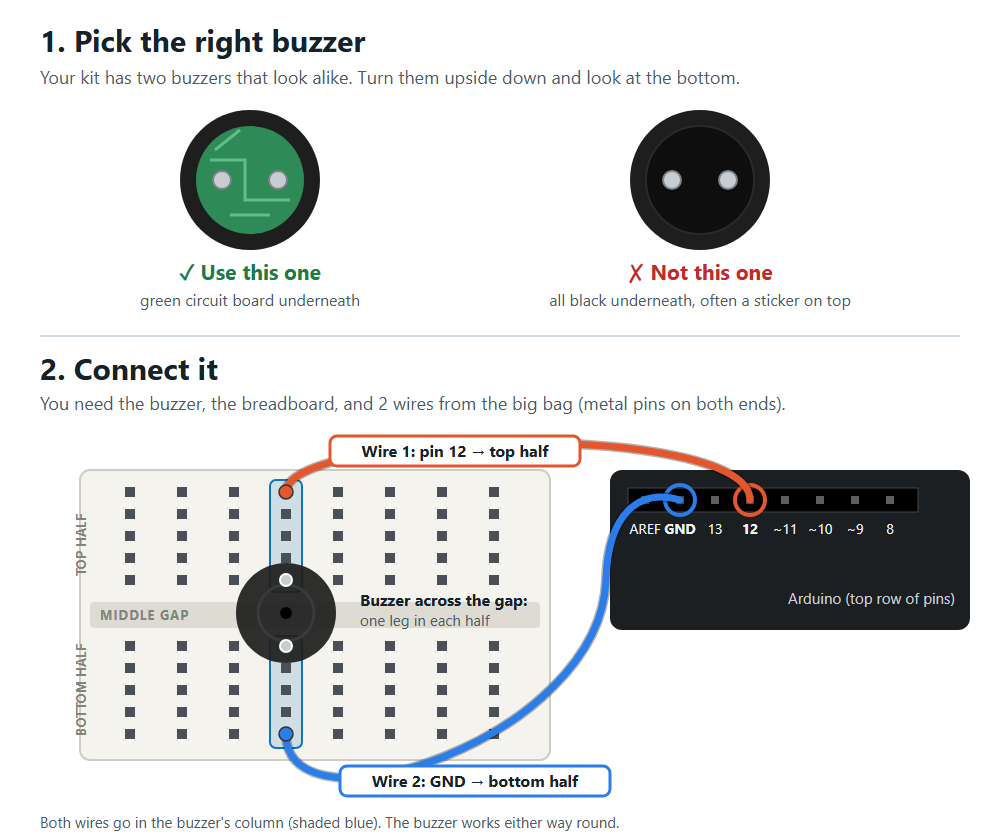
Push the buzzer across the middle gap of the breadboard, so each leg is in a different row.
2Two wires
One wire from Arduino pin 12 to one buzzer leg's row, and one from Arduino GND to the other leg's row. It works either way round.
3Upload and listen
Upload the code (see Getting started). The first song plays straight away. Press reset for the next one.
Pick a song from the computer
In the Serial Monitor (9600 baud), type 1, 2, 3 or 4 and press Enter to play that song.
Make your own song
Each song is pairs of numbers: a note, then how long it lasts in sixteenth notes (4 = a quarter note, 8 = a half note). REST is silence, and 0, 0 marks the end. Copy one of the songs in the code, change the notes, and add its name to the SONGS and NAMES lists.
If it doesn't work
- Just clicks, or one flat beep: that's the active buzzer (white sticker). Use the plain one with no sticker.
- Silent: check both legs are in different rows, and the wires are in the same rows as the legs.
The code
Copy it into the Arduino app, or download the file. New to this? Start with Getting started.
// Plays songs on the passive buzzer from the Elegoo kit.//// Wiring: buzzer across the middle gap of the breadboard. One wire from// Arduino pin 12 to the buzzer's top leg, one wire from Arduino GND to// its bottom leg. The buzzer works either way round.//// Each time the board starts (or you press its red reset button) it plays// the next song. You can also send a number from the computer (1-4) to// play that song. The "L" light on the board flashes with the notes.#include <EEPROM.h>const byte BUZZER_PIN = 12;// Note frequencies, in Hz.const int REST = 0;const int NOTE_G4 = 392, NOTE_A4 = 440, NOTE_B4 = 494;const int NOTE_C5 = 523, NOTE_D5 = 587, NOTE_E5 = 659, NOTE_F5 = 698, NOTE_G5 = 784, NOTE_A5 = 880;// Each song is pairs of (note, length). Length is in 16th notes, so// 4 = a quarter note, 8 = a half note. A length of 0 marks the end.const int HAPPY_BIRTHDAY[] PROGMEM = { NOTE_G4, 3, NOTE_G4, 1, NOTE_A4, 4, NOTE_G4, 4, NOTE_C5, 4, NOTE_B4, 8, NOTE_G4, 3, NOTE_G4, 1, NOTE_A4, 4, NOTE_G4, 4, NOTE_D5, 4, NOTE_C5, 8, NOTE_G4, 3, NOTE_G4, 1, NOTE_G5, 4, NOTE_E5, 4, NOTE_C5, 4, NOTE_B4, 4, NOTE_A4, 8, NOTE_F5, 3, NOTE_F5, 1, NOTE_E5, 4, NOTE_C5, 4, NOTE_D5, 4, NOTE_C5, 12, 0, 0};const int TWINKLE[] PROGMEM = { NOTE_C5, 4, NOTE_C5, 4, NOTE_G5, 4, NOTE_G5, 4, NOTE_A5, 4, NOTE_A5, 4, NOTE_G5, 8, NOTE_F5, 4, NOTE_F5, 4, NOTE_E5, 4, NOTE_E5, 4, NOTE_D5, 4, NOTE_D5, 4, NOTE_C5, 8, NOTE_G5, 4, NOTE_G5, 4, NOTE_F5, 4, NOTE_F5, 4, NOTE_E5, 4, NOTE_E5, 4, NOTE_D5, 8, NOTE_G5, 4, NOTE_G5, 4, NOTE_F5, 4, NOTE_F5, 4, NOTE_E5, 4, NOTE_E5, 4, NOTE_D5, 8, NOTE_C5, 4, NOTE_C5, 4, NOTE_G5, 4, NOTE_G5, 4, NOTE_A5, 4, NOTE_A5, 4, NOTE_G5, 8, NOTE_F5, 4, NOTE_F5, 4, NOTE_E5, 4, NOTE_E5, 4, NOTE_D5, 4, NOTE_D5, 4, NOTE_C5, 8, 0, 0};const int ODE_TO_JOY[] PROGMEM = { NOTE_E5, 4, NOTE_E5, 4, NOTE_F5, 4, NOTE_G5, 4, NOTE_G5, 4, NOTE_F5, 4, NOTE_E5, 4, NOTE_D5, 4, NOTE_C5, 4, NOTE_C5, 4, NOTE_D5, 4, NOTE_E5, 4, NOTE_E5, 6, NOTE_D5, 2, NOTE_D5, 8, NOTE_E5, 4, NOTE_E5, 4, NOTE_F5, 4, NOTE_G5, 4, NOTE_G5, 4, NOTE_F5, 4, NOTE_E5, 4, NOTE_D5, 4, NOTE_C5, 4, NOTE_C5, 4, NOTE_D5, 4, NOTE_E5, 4, NOTE_D5, 6, NOTE_C5, 2, NOTE_C5, 8, 0, 0};const int JINGLE_BELLS[] PROGMEM = { NOTE_E5, 4, NOTE_E5, 4, NOTE_E5, 8, NOTE_E5, 4, NOTE_E5, 4, NOTE_E5, 8, NOTE_E5, 4, NOTE_G5, 4, NOTE_C5, 6, NOTE_D5, 2, NOTE_E5, 16, NOTE_F5, 4, NOTE_F5, 4, NOTE_F5, 6, NOTE_F5, 2, NOTE_F5, 4, NOTE_E5, 4, NOTE_E5, 4, NOTE_E5, 2, NOTE_E5, 2, NOTE_E5, 4, NOTE_D5, 4, NOTE_D5, 4, NOTE_E5, 4, NOTE_D5, 8, NOTE_G5, 8, NOTE_E5, 4, NOTE_E5, 4, NOTE_E5, 8, NOTE_E5, 4, NOTE_E5, 4, NOTE_E5, 8, NOTE_E5, 4, NOTE_G5, 4, NOTE_C5, 6, NOTE_D5, 2, NOTE_E5, 16, NOTE_F5, 4, NOTE_F5, 4, NOTE_F5, 6, NOTE_F5, 2, NOTE_F5, 4, NOTE_E5, 4, NOTE_E5, 4, NOTE_E5, 2, NOTE_E5, 2, NOTE_G5, 4, NOTE_G5, 4, NOTE_F5, 4, NOTE_D5, 4, NOTE_C5, 16, 0, 0};const int *const SONGS[] = {HAPPY_BIRTHDAY, TWINKLE, ODE_TO_JOY, JINGLE_BELLS};const char *const NAMES[] = {"Happy Birthday", "Twinkle Twinkle Little Star", "Ode to Joy", "Jingle Bells"};const int MS_PER_16TH[] = {150, 125, 125, 110}; // speed of each songconst byte SONG_COUNT = 4;const int NEXT_SONG_ADDRESS = 0; // where the board remembers which song is nextvoid setup() { pinMode(LED_BUILTIN, OUTPUT); Serial.begin(9600); Serial.println("Ready. Send 1-4 to play a song:"); for (byte i = 0; i < SONG_COUNT; i++) { Serial.print(i + 1); Serial.print(" = "); Serial.println(NAMES[i]); } // Play the next song in the list, and remember to play the one after it next time. byte next = EEPROM.read(NEXT_SONG_ADDRESS) % SONG_COUNT; EEPROM.update(NEXT_SONG_ADDRESS, (next + 1) % SONG_COUNT); delay(300); playSong(next);}void loop() { if (Serial.available()) { char c = Serial.read(); if (c >= '1' && c < '1' + SONG_COUNT) playSong(c - '1'); }}void playSong(byte n) { Serial.print("Playing "); Serial.println(NAMES[n]); const int *song = SONGS[n]; for (int i = 0; ; i += 2) { int note = pgm_read_word(song + i); int length = pgm_read_word(song + i + 1); if (length == 0) break; int ms = length * MS_PER_16TH[n]; if (note != REST) { tone(BUZZER_PIN, note, ms * 9 / 10); // leave a tiny gap so repeated notes sound separate digitalWrite(LED_BUILTIN, HIGH); } delay(ms * 9 / 10); digitalWrite(LED_BUILTIN, LOW); delay(ms - ms * 9 / 10); } noTone(BUZZER_PIN); Serial.println("Done");}