Ultrasonic Distance Meter
Point it at a wall and a screen shows how far away it is in feet and inches, from 1 inch up to about 13 feet.
Board: Arduino UNO (Elegoo UNO R3)
What you need
What it is
A pocket tape measure that uses sound. Aim the sensor at a wall and the screen shows the distance two ways, about three times a second:
12 ft  4.5 in
148.5 inches
If nothing is in range it says Out of range, and if something is right up against it, Too close.
How it works
- The sensor's two "eyes" are a tiny speaker and a tiny microphone. It sends a click of sound too high to hear and times the echo.
- Sound takes about 148 microseconds to travel one inch out and back at room temperature, so the time divided by 148 is the distance in inches.
- Steady numbers: it takes 5 readings and uses the middle one, so one odd echo doesn't make the number jump.
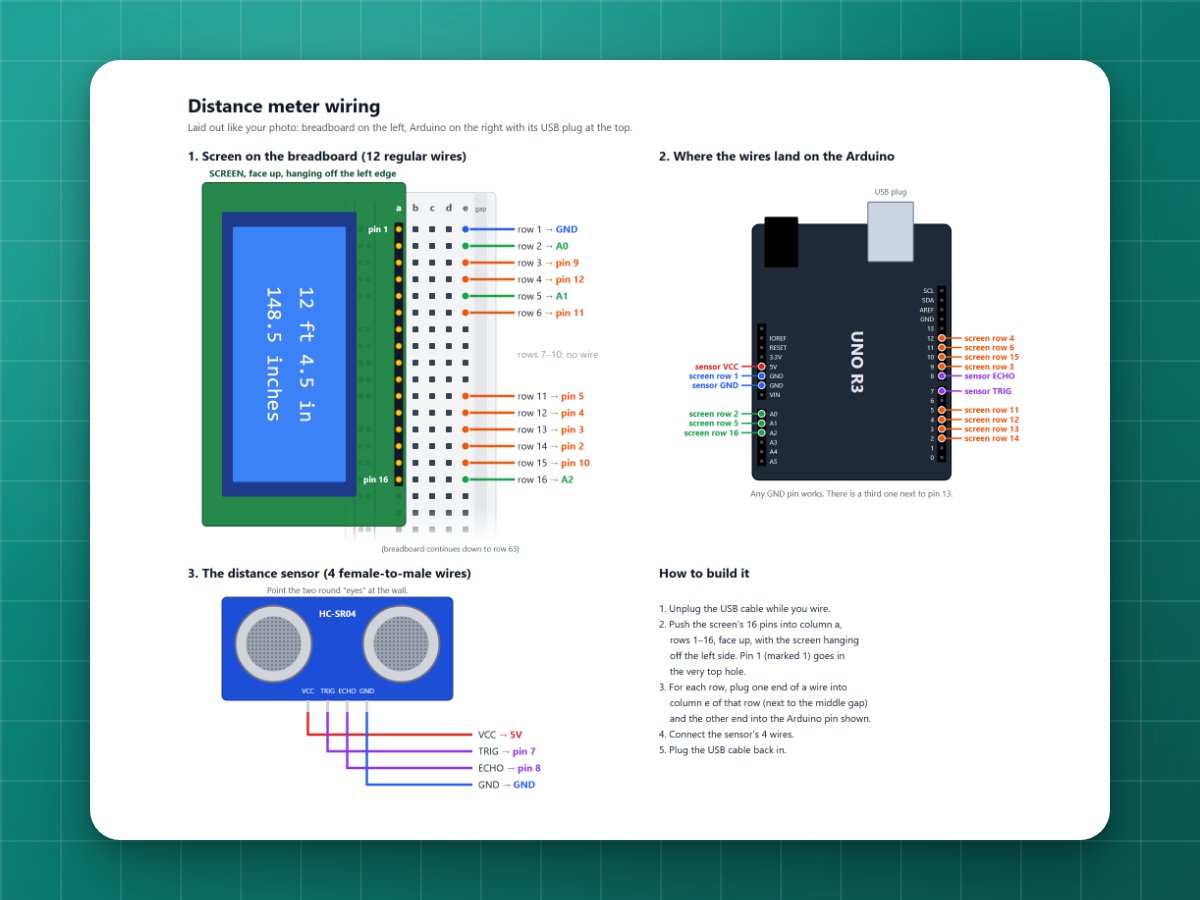
- The screen is wired so it doesn't need the Arduino's 5V or GND pins: pin A0 powers it and A1 and A2 act as ground. That leaves 5V and GND free for the sensor, and every screen pin gets its own wire.
Build it
1Upload the code
Upload the code below first (see Getting started).
2Put the screen on the breadboard
Lay the screen face up with its 16 pins in column a, rows 1 to 16 (screen pin 1, marked VSS, in row 1). The screen hangs off the edge of the breadboard. Each wire then goes from column e of a row to the Arduino.
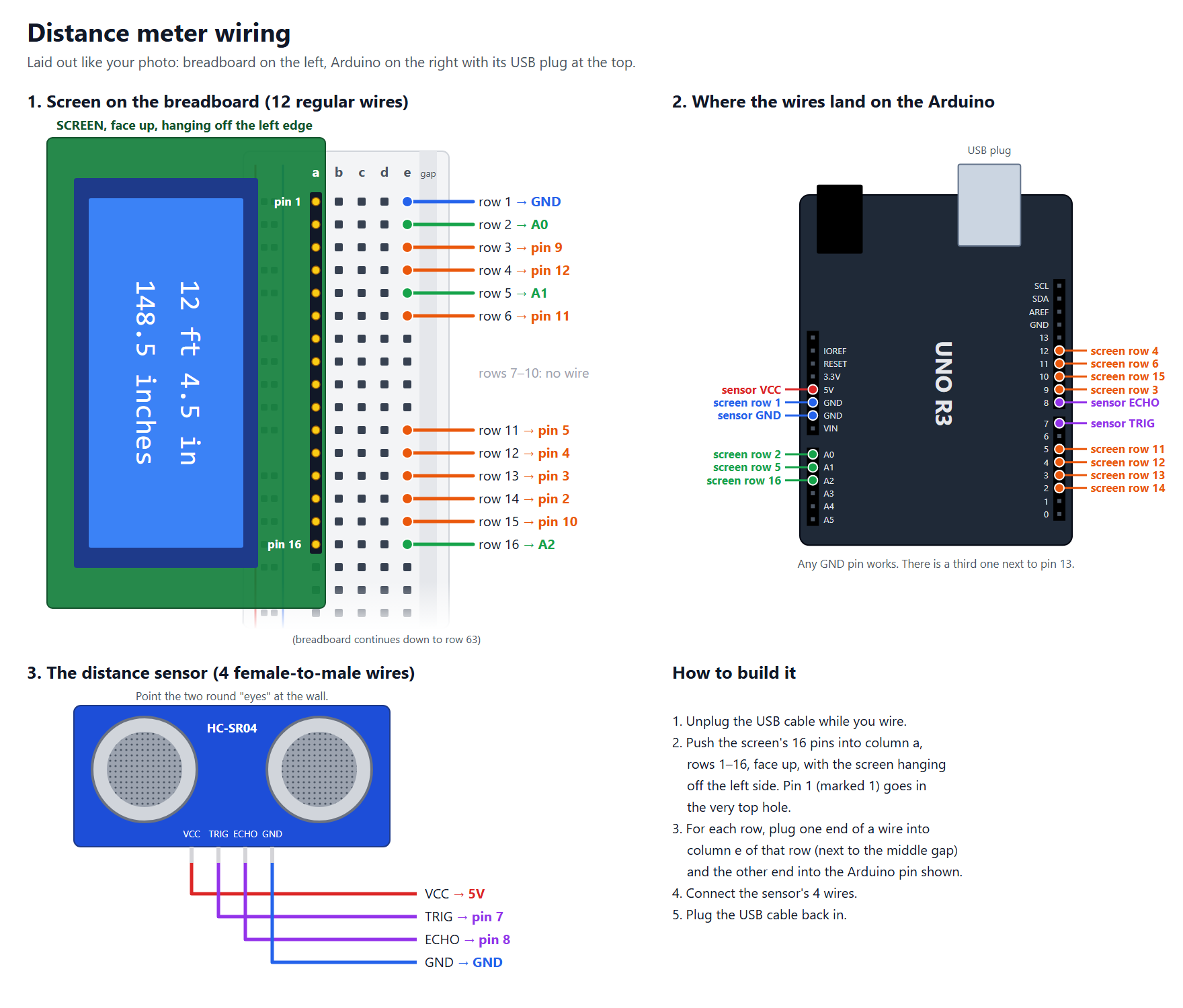
| Screen pin | Name | Arduino |
|---|---|---|
| 1 | VSS | GND |
| 2 | VDD | A0 |
| 3 | V0 (contrast) | 9 |
| 4 | RS | 12 |
| 5 | RW | A1 |
| 6 | E | 11 |
| 7 to 10 | nothing | |
| 11 | D4 | 5 |
| 12 | D5 | 4 |
| 13 | D6 | 3 |
| 14 | D7 | 2 |
| 15 | A (backlight +) | 10 |
| 16 | K (backlight −) | A2 |
3Connect the sensor
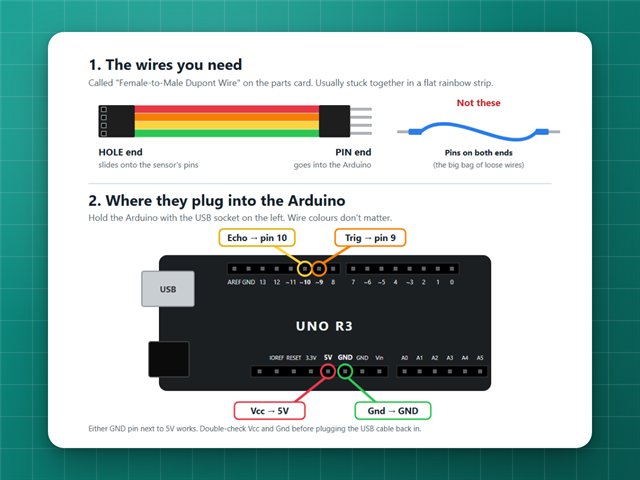
Four female-to-male wires: Vcc → 5V, Trig → 7, Echo → 8, Gnd → GND.
Tip: Trig and Echo can go in 7 and 8 either way round. The Echo pin rests LOW while the sensor has power, so the program looks for that and works out which is which.
4Measure
Aim it straight at a flat wall. The sound spreads out in a cone, so anything in the way (a chair, your other hand) can answer first.
Commands
| Type | What it does |
|---|---|
c 40 | Screen contrast, 0 to 255 (lower = darker letters) |
b 160 | Backlight brightness, 0 to 255 |
Both are saved, so they stay the same on battery.
If it doesn't work
- It always says "Out of range": when I first built mine, Trig and Echo were swapped. The program now fixes that by itself, so check that all four sensor wires are firmly on and the sensor has power.
- Numbers jump around: soft things like curtains and couches soak up sound. Aim at something hard and flat.
- Blank screen or solid blocks: change the contrast with
c 20orc 60.
The code
Copy it into the Arduino app, or download the file. New to this? Start with Getting started.
// Distance meter: point the ultrasonic sensor at a wall and the screen shows// how far away it is, in feet and inches, about 3 times a second.//// Ultrasonic sensor (HC-SR04), 4 female-to-male wires:// Vcc -> 5V Trig -> pin 7 Echo -> pin 8 Gnd -> GND// Trig and Echo can go in pins 7 and 8 either way round: the Echo pin rests// LOW while the sensor has power, so the program looks for that and uses// whichever pin it finds as Echo.//// Screen (LCD1602), pin by pin. Pin 1 is the one marked VSS:// 1 VSS -> GND 2 VDD -> A0 3 V0 -> pin 9 4 RS -> pin 12// 5 RW -> A1 6 E -> pin 11 7 to 10 -> nothing// 11 D4 -> pin 5 12 D5 -> pin 4 13 D6 -> pin 3 14 D7 -> pin 2// 15 A -> pin 10 16 K -> A2// A0 powers the screen and A1/A2 act as ground, so every screen pin gets its// own wire and the Arduino's 5V and GND pins are free for the sensor.//// The sensor works from about 1 inch to about 13 feet. Aim it straight at a// flat wall: the sound spreads out in a cone, so furniture in the way can// answer first.//// From the computer:// "c 40" sets the screen contrast, 0 to 255 (lower = darker letters)// "b 160" sets the backlight brightness, 0 to 255// Both are saved, so they stay the same on battery.#include <EEPROM.h>// ---------- Pins ----------const byte SENSOR_PINS[2] = {7, 8};byte trigPin = 7;byte echoPin = 8;const byte LCD_POWER = A0;const byte LCD_RW = A1;const byte LCD_GROUND = A2; // the backlight's K pinconst byte LCD_RS = 12;const byte LCD_E = 11;const byte LCD_DATA[4] = {5, 4, 3, 2}; // the screen's D4, D5, D6, D7const byte LCD_CONTRAST = 9;const byte LCD_LIGHT = 10;// ---------- Measuring ----------// Sound takes about 148 microseconds to go 1 inch out and back at room temperature.const float MICROS_PER_INCH = 148.0;const unsigned long NO_ECHO = 0xFFFFFFFF;const byte READINGS = 5; // take 5 and keep the middle one, to ignore stray echoes// ---------- Saved settings ----------struct Settings { byte check; byte contrast; byte backlight;};const byte SETTINGS_CHECK = 0xD5;Settings settings;void setup() { Serial.begin(9600); Serial.println("Distance meter starting"); EEPROM.get(0, settings); if (settings.check != SETTINGS_CHECK) { settings = {SETTINGS_CHECK, 40, 160}; EEPROM.put(0, settings); } // Pins 9 and 10 flicker on and off very fast to set contrast and brightness. // Making them flicker faster (31,000 times a second) keeps the screen steady. TCCR1B = (TCCR1B & 0b11111000) | 0b001; pinMode(LCD_CONTRAST, OUTPUT); pinMode(LCD_LIGHT, OUTPUT); analogWrite(LCD_CONTRAST, settings.contrast); analogWrite(LCD_LIGHT, settings.backlight); // Ground pins first, then switch the screen's power on. pinMode(LCD_RW, OUTPUT); digitalWrite(LCD_RW, LOW); pinMode(LCD_GROUND, OUTPUT); digitalWrite(LCD_GROUND, LOW); pinMode(LCD_POWER, OUTPUT); digitalWrite(LCD_POWER, HIGH); delay(100); lcdBegin(); lcdPrintAt(0, 0, " Distance meter "); lcdPrintAt(0, 1, " Aim at a wall "); findSensorPins(); delay(1000);}void loop() { readComputer(); unsigned long echoTime = measureMicros(); if (echoTime == NO_ECHO) findSensorPins(); // in case the wires were swapped or plugged in late // Repeat the screen's start-up routine before every update, so a screen // that had a glitch gets back in step. lcdWake(); if (echoTime == NO_ECHO) { showLines(" Out of range ", " (max ~13 feet) "); Serial.println("Out of range"); } else if (echoTime < MICROS_PER_INCH) { showLines(" Too close ", " (min 1 inch) "); Serial.println("Too close"); } else { showDistance(echoTime / MICROS_PER_INCH); }}// ---------- Measuring ----------// Works out which of pins 7 and 8 is Echo: with a pull-up on, the Echo pin// still reads LOW because the sensor holds it there; the Trig pin reads HIGH.// If it can't tell (sensor unplugged, or busy), it keeps the last choice.void findSensorPins() { pinMode(SENSOR_PINS[0], INPUT_PULLUP); pinMode(SENSOR_PINS[1], INPUT_PULLUP); delay(2); bool low0 = digitalRead(SENSOR_PINS[0]) == LOW; bool low1 = digitalRead(SENSOR_PINS[1]) == LOW; if (low0 != low1) { echoPin = low0 ? SENSOR_PINS[0] : SENSOR_PINS[1]; trigPin = low0 ? SENSOR_PINS[1] : SENSOR_PINS[0]; } pinMode(echoPin, INPUT); pinMode(trigPin, OUTPUT); digitalWrite(trigPin, LOW);}// Measures 5 times and returns the middle echo time, in microseconds.unsigned long measureMicros() { unsigned long times[READINGS]; for (byte i = 0; i < READINGS; i++) { times[i] = echoMicros(); delay(60); // the sensor needs a short rest between measurements } // Sort them, smallest first. for (byte i = 1; i < READINGS; i++) { for (byte j = i; j > 0 && times[j] < times[j - 1]; j--) { unsigned long swap = times[j]; times[j] = times[j - 1]; times[j - 1] = swap; } } return times[READINGS / 2];}// Sends out a click of sound and times how long the echo takes to come back.// Returns NO_ECHO if nothing came back within about 16 feet.unsigned long echoMicros() { digitalWrite(trigPin, LOW); delayMicroseconds(2); digitalWrite(trigPin, HIGH); delayMicroseconds(10); digitalWrite(trigPin, LOW); unsigned long microseconds = pulseIn(echoPin, HIGH, 30000); return microseconds == 0 ? NO_ECHO : microseconds;}// ---------- Showing it ----------// Shows e.g. 12 ft 4.5 in// 148.5 inchesvoid showDistance(float inches) { long tenths = lround(inches * 10); // whole distance in tenths of an inch int feet = tenths / 120; int leftoverTenths = tenths % 120; char top[17], bottom[17], number[8]; snprintf(top, sizeof(top), "%2d ft %2d.%d in", feet, leftoverTenths / 10, leftoverTenths % 10); dtostrf(tenths / 10.0, 5, 1, number); snprintf(bottom, sizeof(bottom), "%s inches", number); showLines(top, bottom); Serial.print(top); Serial.print(" ("); Serial.print(bottom); Serial.println(")");}// Puts one line on each row, centered, blanking out anything left over.void showLines(const char *top, const char *bottom) { const char *lines[2] = {top, bottom}; for (byte row = 0; row < 2; row++) { char line[17]; byte length = strlen(lines[row]); if (length > 16) length = 16; byte left = (16 - length) / 2; memset(line, ' ', 16); memcpy(line + left, lines[row], length); line[16] = '\0'; lcdPrintAt(0, row, line); }}// ---------- Settings from the computer ----------void readComputer() { static char line[20]; static byte length = 0; while (Serial.available()) { char ch = Serial.read(); if (ch == '\n' || ch == '\r') { line[length] = '\0'; if (length > 0) handleCommand(line); length = 0; } else if (length < sizeof(line) - 1) { line[length++] = ch; } }}void handleCommand(const char *line) { int value = constrain(atoi(line + 1), 0, 255); if (line[0] == 'c') { settings.contrast = value; analogWrite(LCD_CONTRAST, settings.contrast); } else if (line[0] == 'b') { settings.backlight = value; analogWrite(LCD_LIGHT, settings.backlight); } else { return; } EEPROM.put(0, settings); Serial.print("Saved: contrast "); Serial.print(settings.contrast); Serial.print(", backlight "); Serial.println(settings.backlight);}// ---------- Screen ----------// The screen takes letters 4 bits at a time on its D4-D7 pins. RS picks// between a command (LOW) and a letter (HIGH), and a pulse on E sends it.void lcdBegin() { pinMode(LCD_RS, OUTPUT); pinMode(LCD_E, OUTPUT); for (byte i = 0; i < 4; i++) pinMode(LCD_DATA[i], OUTPUT); digitalWrite(LCD_E, LOW); digitalWrite(LCD_RS, LOW); delay(50); // give the screen time to wake up lcdWake(); lcdSend(0x01, false); // clear the screen delay(2);}// The screen's start-up routine: whatever state it's in, this switches it// into 4-bit mode with 2 lines of text. It doesn't clear the screen, so it// can be repeated without any flicker.void lcdWake() { digitalWrite(LCD_RS, LOW); lcdNibble(0x3); delay(5); lcdNibble(0x3); delayMicroseconds(150); lcdNibble(0x3); delayMicroseconds(150); lcdNibble(0x2); delayMicroseconds(150); lcdSend(0x28, false); // 2 lines of text lcdSend(0x0C, false); // screen on, no cursor lcdSend(0x06, false); // move right after each letter}void lcdNibble(byte bits) { for (byte i = 0; i < 4; i++) digitalWrite(LCD_DATA[i], (bits >> i) & 1); digitalWrite(LCD_E, HIGH); delayMicroseconds(1); digitalWrite(LCD_E, LOW); delayMicroseconds(100);}void lcdSend(byte value, bool isLetter) { digitalWrite(LCD_RS, isLetter ? HIGH : LOW); lcdNibble(value >> 4); lcdNibble(value & 0x0F);}void lcdPrintAt(byte column, byte row, const char *text) { lcdSend(0x80 | (column + (row ? 0x40 : 0)), false); while (*text) lcdSend(*text++, true);}