Mini Fan with a Light Show
The kit's little DC motor becomes a fan you switch with the reset button, with a light, and a 45-second show of beeps and songs when it starts.
Board: Arduino UNO (Elegoo UNO R3)
Work in progress. The fan and the light work. The buzzer part of the show never made a sound on my small breadboard (probably a leg in the wrong row), so I took it apart. If you build it on a full-size breadboard, let me know if the show works!
What you need
What it is
Plug it in and it puts on a show: beeps, Twinkle Twinkle, the fan revving up, swoops, winding down, and a Jingle Bells finale. Then the fan keeps running at full speed with its light on. Press the red reset button to turn everything off, and again to start the show again.
How it works
- A motor needs more current than a pin can give, so pin 3 switches a transistor, and the transistor switches the motor's power. It's like a tiny relay with no moving parts.
- The diode protects the transistor: when a motor turns off, it kicks back a burst of voltage, and the diode soaks it up.
- Speed: pin 3 turns on and off thousands of times a second (PWM). The longer it's on each time, the faster the fan.
- The reset button as an on/off switch: pressing reset restarts the program, but a special part of memory survives a reset (and not unplugging). The program keeps a note there of whether the fan was on, and flips it each time.
- Beeps without breaking the fan: the usual
tone()command uses the same timer as pin 3's speed control, so the program makes its sounds with a different timer instead.
Build it
1The fan
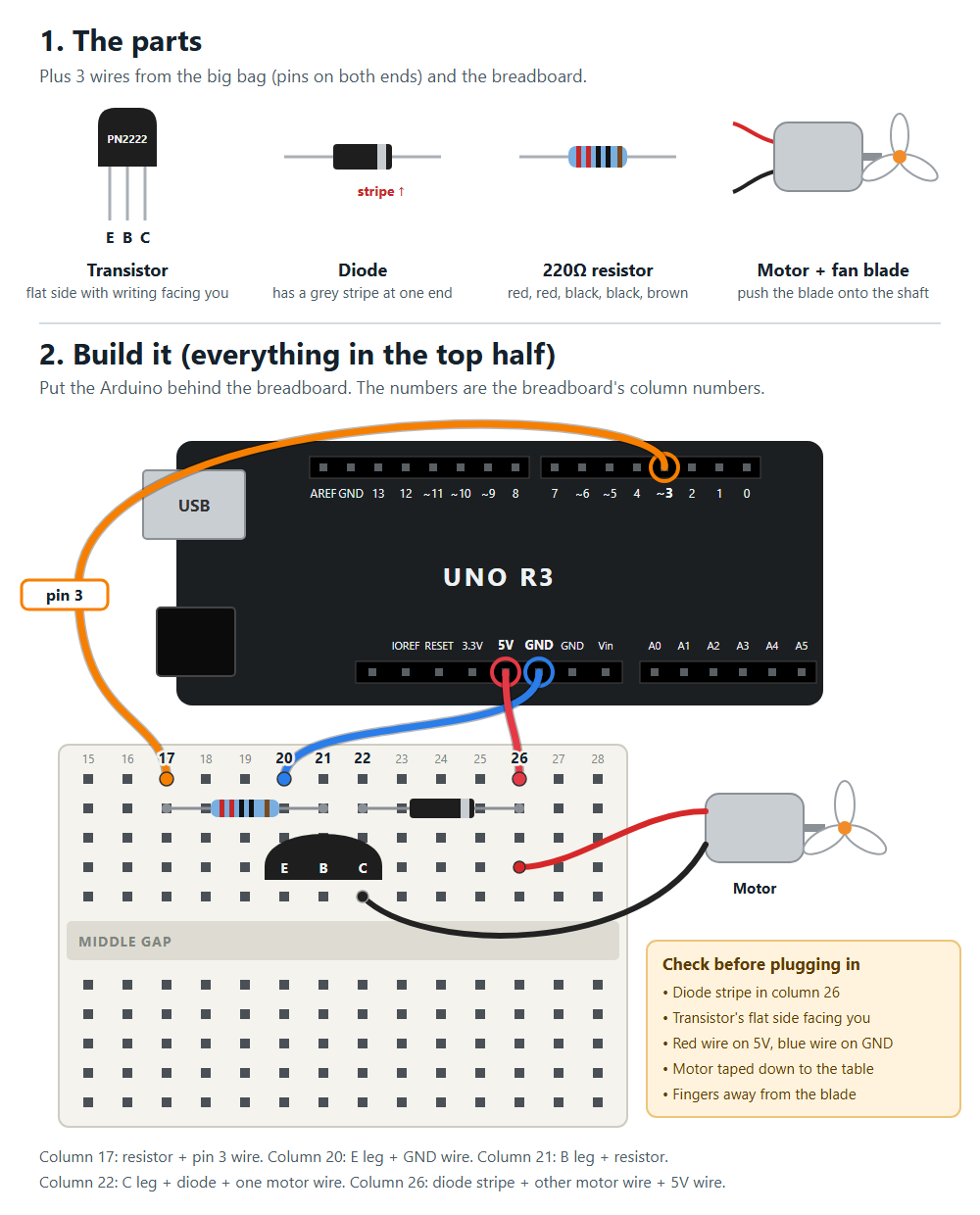
Hold the transistor with its flat side facing you: the legs left to right are E, B, C.
| Column | What goes in it |
|---|---|
| 17 | one end of a 220 ohm resistor + a wire to Arduino pin 3 |
| 20 | transistor E + a wire to Arduino GND |
| 21 | transistor B + the other end of the resistor |
| 22 | transistor C + the diode end WITHOUT the stripe + one motor wire |
| 26 | the diode end WITH the stripe + the other motor wire + a wire to Arduino 5V |
Warning: The diode's stripe must face the 5V side. Backwards, it short-circuits the 5V when the transistor turns on.
2The light
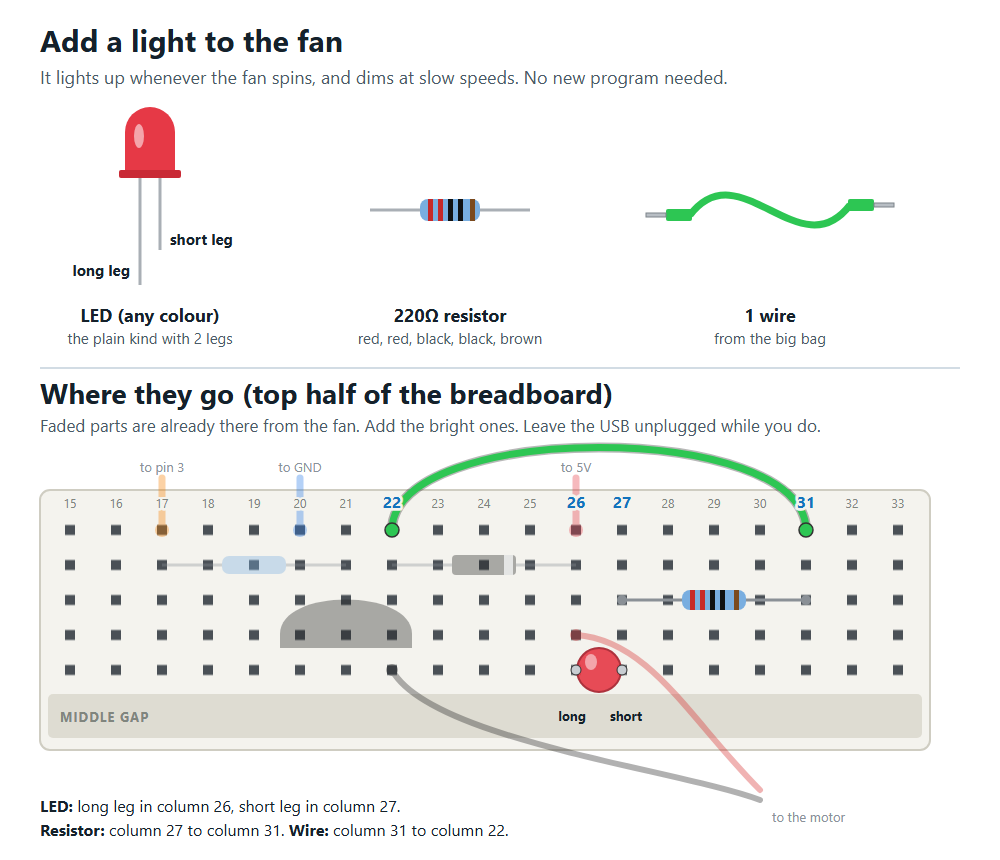
LED long leg in column 26, short leg in column 27, a 220 ohm resistor from column 27 to column 31.
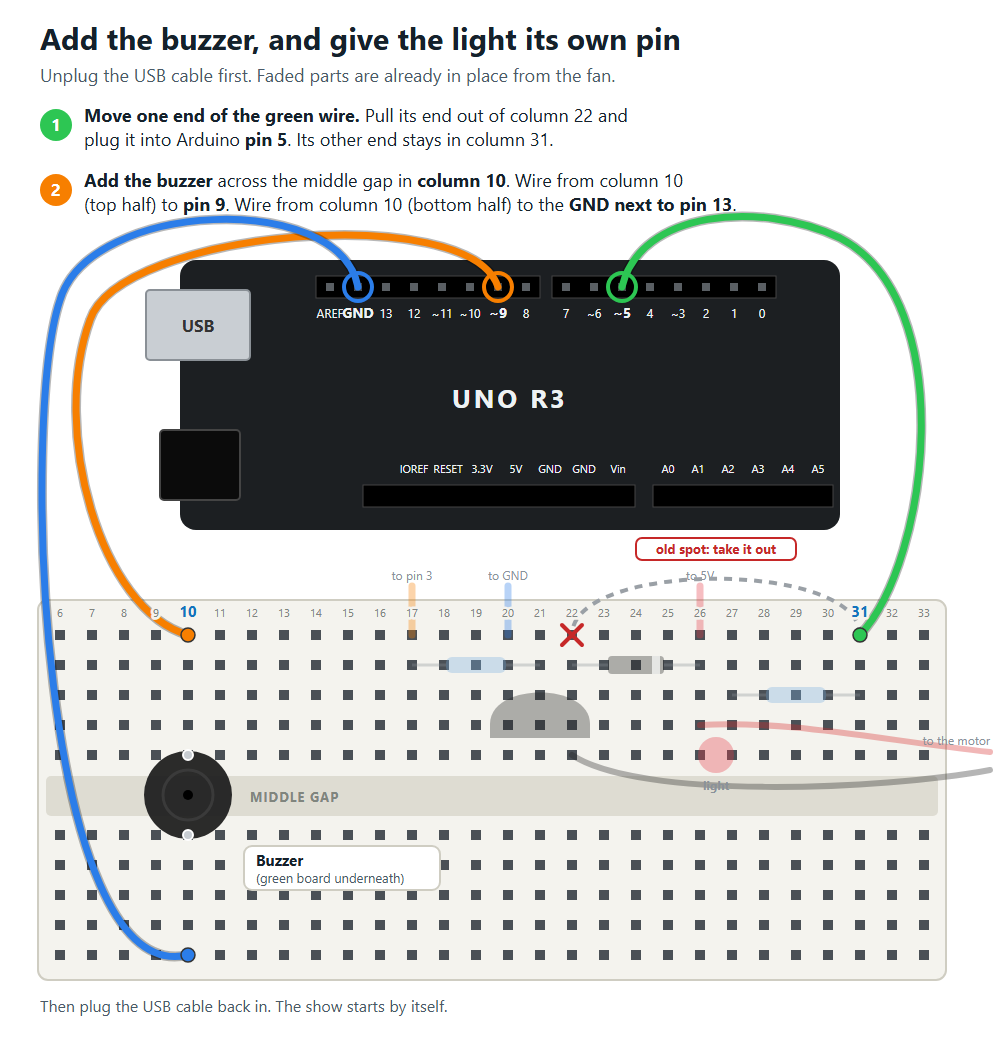
3The buzzer and the light's own pin
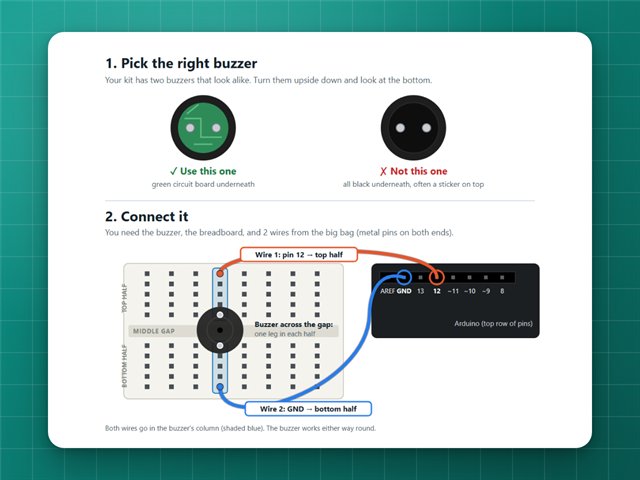
Move the light's wire to pin 5, and add the buzzer across the middle gap, wired to pin 9 and GND.
4Upload
Upload the code (see Getting started). The show starts by itself.
Commands
In the Serial Monitor (9600 baud): s plays the show, 0 turns the fan off and 1 to 9 set the speed.
If it doesn't work
- The Arduino restarts when the motor starts: the motor pulls too much power from USB. Use the kit's power supply module for the motor's 5V.
- No sound from the buzzer: make sure its two legs are in different rows, and that the wires go to those same rows. Pins 9 and 11 play the same sound, so you can try pin 11 too.
- The fan doesn't spin at low speeds: below about speed 1 (90 out of 255) the motor doesn't have enough push to start.
The code
Copy it into the Arduino app, or download the file. New to this? Start with Getting started.
// The fan, the light and the buzzer from the Elegoo kit, putting on a show.//// Wiring (top half of the breadboard unless it says otherwise; transistor flat// side facing you, legs left to right: E, B, C):// Fan: column 17: one end of a 220 ohm resistor + wire to Arduino pin 3// column 20: transistor E leg + wire to Arduino GND// column 21: transistor B leg + other end of the resistor// column 22: transistor C leg + diode end WITHOUT the stripe + one motor wire// column 26: diode end WITH the stripe + other motor wire + wire to Arduino 5V// Light: LED long leg in column 26, short leg in column 27, 220 ohm resistor// from column 27 to column 31, wire from column 31 to Arduino pin 5.// The long leg is on 5V, so the light comes on when pin 5 goes LOW.// Buzzer: on the empty side of the breadboard, legs in two different rows.// One leg's row goes to Arduino pin 9, the other leg's row to GND.// (Pin 11 plays the same sound, so the buzzer can use either.)//// How it works:// - Plug it in: the show plays, then the fan keeps running with the light on.// - Press the red reset button on the Arduino: everything turns off.// - Press it again: the show plays again, then the fan keeps running.// - From the computer: send "s" to play the show, or 0 (off) to 9 (full speed).const byte FAN_PIN = 3;const byte LIGHT_PIN = 5;const byte BUZZER_PIN = 9; // buzzerOn() flips pins 9 and 11 directly,const byte BUZZER_PIN_SPARE = 11; // so these can't be changed to other pins// Note frequencies, in Hz.const int NOTE_C5 = 523, NOTE_D5 = 587, NOTE_E5 = 659, NOTE_F5 = 698;const int NOTE_G5 = 784, NOTE_A5 = 880, NOTE_C6 = 1047;// Each song is pairs of (note, length). Length is in 16th notes, so// 4 = a quarter note, 8 = a half note. A length of 0 marks the end.const int TWINKLE[] PROGMEM = { NOTE_C5, 4, NOTE_C5, 4, NOTE_G5, 4, NOTE_G5, 4, NOTE_A5, 4, NOTE_A5, 4, NOTE_G5, 8, NOTE_F5, 4, NOTE_F5, 4, NOTE_E5, 4, NOTE_E5, 4, NOTE_D5, 4, NOTE_D5, 4, NOTE_C5, 8, 0, 0};const int JINGLE_BELLS[] PROGMEM = { NOTE_E5, 4, NOTE_E5, 4, NOTE_E5, 8, NOTE_E5, 4, NOTE_E5, 4, NOTE_E5, 8, NOTE_E5, 4, NOTE_G5, 4, NOTE_C5, 6, NOTE_D5, 2, NOTE_E5, 16, NOTE_F5, 4, NOTE_F5, 4, NOTE_F5, 6, NOTE_F5, 2, NOTE_F5, 4, NOTE_E5, 4, NOTE_E5, 4, NOTE_E5, 2, NOTE_E5, 2, NOTE_G5, 4, NOTE_G5, 4, NOTE_F5, 4, NOTE_D5, 4, NOTE_C5, 16, 0, 0};const int FANFARE[4] = {NOTE_C5, NOTE_E5, NOTE_G5, NOTE_C6};// Fan power for each speed setting, out of 255. Below about 90 the motor// doesn't have enough push to turn the blade.const int SPEEDS[10] = {0, 90, 110, 130, 150, 170, 190, 210, 235, 255};// The reset button restarts the program from the beginning, so these live in// a part of memory that the restart doesn't wipe. Unplugging does wipe it,// which is how the program tells "just plugged in" apart from "button pressed".const unsigned long REMEMBERED = 0xC0FFEE42;unsigned long memoryCheck __attribute__((section(".noinit")));byte fanWasOn __attribute__((section(".noinit")));byte lastSpeed __attribute__((section(".noinit")));int fanPower = 0;void setup() { pinMode(FAN_PIN, OUTPUT); pinMode(LIGHT_PIN, OUTPUT); pinMode(BUZZER_PIN, OUTPUT); pinMode(BUZZER_PIN_SPARE, OUTPUT); light(0); Serial.begin(9600); if (memoryCheck != REMEMBERED) { // Just plugged in. memoryCheck = REMEMBERED; fanWasOn = true; lastSpeed = 9; Serial.println("Plugged in: on"); } else { // The reset button was pressed: flip between on and off. fanWasOn = !fanWasOn; Serial.println(fanWasOn ? "Button pressed: on" : "Button pressed: off"); } if (lastSpeed < 1 || lastSpeed > 9) lastSpeed = 9; if (fanWasOn) { runShow(); setSpeed(lastSpeed); } else { beep(NOTE_G5, 100); // a little "bye" so you know the button worked delay(40); beep(NOTE_C5, 160); }}void loop() { if (!Serial.available()) return; char c = Serial.read(); if (c == 's') { runShow(); fanWasOn = true; setSpeed(lastSpeed); } else if (c >= '0' && c <= '9') { byte level = c - '0'; fanWasOn = level > 0; if (level > 0) lastSpeed = level; setSpeed(level); }}// ---------- The show ----------void runShow() { Serial.println("Show starting"); light(0); fanRampTo(0); delay(500); // 1. Wake-up beeps. for (byte i = 0; i < 4; i++) { beep(FANFARE[i], 120); delay(60); } delay(500); // 2. A little tune, with the light blinking on every note. playSong(TWINKLE, 120, false); delay(600); // 3. The fan slowly revs up. The light and the buzzer tick faster and // faster as it speeds up, like an engine. fan(180); // a stopped motor needs a push to get going delay(200); rev(110, 255, 6000); light(255); delay(1000); // 4. Three swoops, slow and fast. The light dims and brightens with the // fan, and the buzzer chirps at the top of each one. for (byte i = 0; i < 3; i++) swoop(); // 5. The fan winds down, ticking slower and slower. rev(255, 100, 4000); // 6. Finale: Jingle Bells. The light flashes on every note and the fan // speeds up on the high notes. playSong(JINGLE_BELLS, 110, true); // 7. Big finish: fanfare, three flashes, then full speed with the light on. for (byte i = 0; i < 4; i++) { beep(FANFARE[i], 90); delay(30); } for (byte i = 0; i < 3; i++) { light(255); delay(120); light(0); delay(120); } fanRampTo(255); light(255); Serial.println("Show over");}// Plays a song. The light flashes on every note. If dance is true, the fan// speeds up on high notes and slows down on low ones.void playSong(const int *song, int msPer16th, bool dance) { for (int i = 0; ; i += 2) { int note = pgm_read_word(song + i); int length = pgm_read_word(song + i + 1); if (length == 0) break; int ms = length * msPer16th; buzzerOn(note); light(255); if (dance) fan(map(note, NOTE_C5, NOTE_C6, 100, 255)); delay(ms * 8 / 10); buzzerOff(); light(0); delay(ms - ms * 8 / 10); }}// Moves the fan from one power to another over the given time. The light// blinks and the buzzer ticks along with it, faster when the fan is faster.void rev(int fromPower, int toPower, unsigned long ms) { unsigned long start = millis(); unsigned long nextTick = start; while (millis() - start < ms) { int p = fromPower + (long)(toPower - fromPower) * (long)(millis() - start) / (long)ms; fan(p); if ((long)(millis() - nextTick) >= 0) { int speed = constrain(p, 100, 255); buzzerOn(map(speed, 100, 255, 400, 1200)); light(255); delay(25); buzzerOff(); light(0); nextTick = millis() + map(speed, 100, 255, 450, 70); } } fan(toPower);}// One slow-down-and-speed-up swoop, with the light following the fan.void swoop() { for (int p = 255; p >= 110; p -= 3) { fan(p); light(map(p, 110, 255, 5, 255)); delay(18); } for (int p = 110; p <= 255; p += 3) { fan(p); light(map(p, 110, 255, 5, 255)); delay(18); } buzzerOn(NOTE_C6); delay(70); buzzerOff();}// ---------- Fan, light and buzzer ----------void fan(int power) { fanPower = power; analogWrite(FAN_PIN, power);}// The LED's long leg is on 5V, so it lights up when this pin goes LOW.void light(byte brightness) { analogWrite(LIGHT_PIN, 255 - brightness);}// Changes the fan's speed setting gradually, so the motor doesn't grab a big// gulp of power all at once (that can make the Arduino restart).void setSpeed(byte level) { int target = SPEEDS[level]; if (fanPower == 0 && target > 0 && target < 180) { fanRampTo(180); // a stopped motor needs a push to get going delay(300); } fanRampTo(target); light(level > 0 ? 255 : 0); Serial.print("Speed "); Serial.println(level);}void fanRampTo(int target) { while (fanPower != target) { if (fanPower < target) fan(min(fanPower + 5, target)); else fan(max(fanPower - 5, target)); delay(15); }}void beep(unsigned int hz, int ms) { buzzerOn(hz); light(255); delay(ms); buzzerOff(); light(0);}// The buzzer runs on the Arduino's Timer1: every time the timer's count// reaches the top, it flips pins 9 and 11 on or off, which makes the sound.// (Arduino's built-in tone() would borrow the timer the fan uses on pin 3.)void buzzerOn(unsigned int hz) { unsigned int top = 1000000UL / hz - 1; // the timer counts 2 million times a second OCR1A = top; if (TCNT1 > top) TCNT1 = 0; TCCR1A = 0; TCCR1B = _BV(WGM12) | _BV(CS11); // count up to the top and start over TIMSK1 = _BV(OCIE1A); // run the code below each time it gets there}ISR(TIMER1_COMPA_vect) { PINB = _BV(PB1) | _BV(PB3); // flip pins 9 and 11}void buzzerOff() { TIMSK1 = 0; TCCR1B = 0; digitalWrite(BUZZER_PIN, LOW); digitalWrite(BUZZER_PIN_SPARE, LOW);}